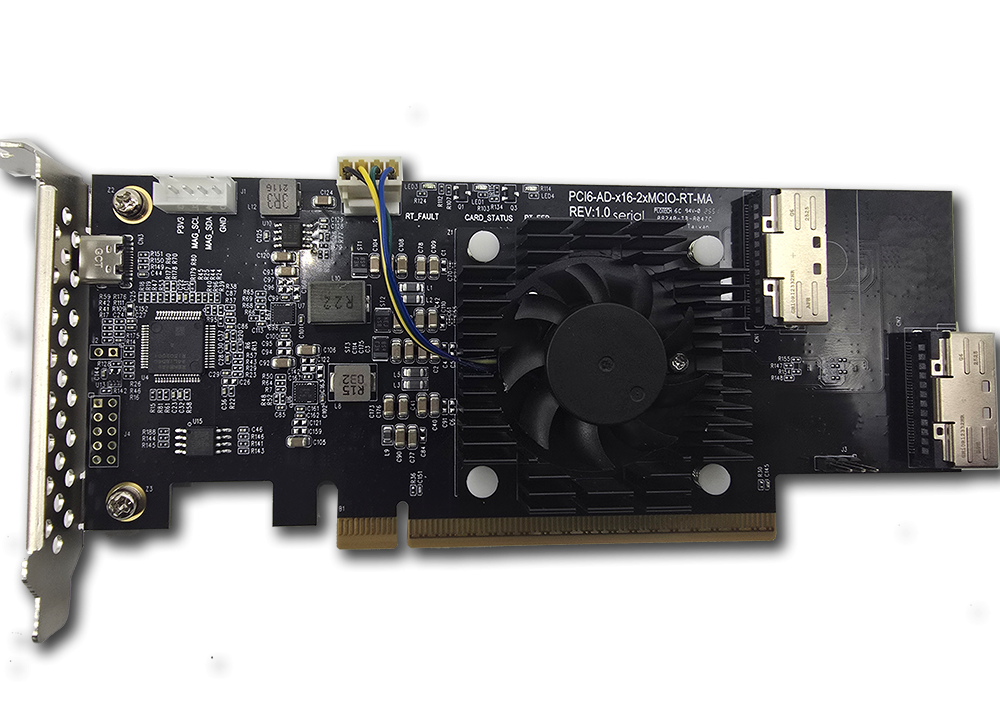
The Serial Cables Gen6 PCIe/CXL 3.x AIC to 2×8 MCIO Retimer (PCI6-AD-x16-2xMCIO-RT) is a half-height, half-length PCIe 6.0 / CXL 3.1 retimer add-in card with two MCIO x8 (SFF-TA-1016) connectors, available with Marvell or Credo retimer silicon, powered directly from the host PCIe slot and managed over a USB-C CLI.
What it is
The Serial Cables Gen6 PCIe/CXL 3.x AIC to 2×8 MCIO Retimer is a PCIe add-in card (AIC) that installs in a host system’s PCIe Gen6 x16 slot and carries the link out to downstream devices over two MCIO x8 cable connectors, fully recovering and re-driving the signal along the way. It is manufactured by Serial Cables, LLC (Englewood, Colorado, USA), and its part number / SKU is PCI6-AD-x16-2xMCIO-RT, available in two vendor-specific variants: PCI6-AD-x16-2xMCIO-RT-MA (Marvell MV-CHP10160-A0-FH228AB-C06ES) and PCI6-AD-x16-2xMCIO-RT-CR (Credo CPR61664-A1-ACKY).
Unlike a linear redriver, this card performs full signal retiming: it recovers the clock and data from the incoming signal before re-driving a clean, regenerated output. It is a half-height, half-length (HHHL) PCIe add-in card that draws power directly from the host PCIe slot — no external power supply is required — and connects to an endpoint or backplane device using two MCIO SFF-TA-1016 x8 connectors (CN1, CN2). Its MCU-driven CLI, accessed over USB Type-C, provides per-port control, diagnostics, and status monitoring.
In one sentence: the Gen6 PCIe/CXL 3.x AIC to 2×8 MCIO Retimer is an HHHL PCIe 6.0 add-in card that fully retimes a host’s x16 Gen6 link out to two MCIO x8 connectors — in Marvell or Credo silicon — drawing power from the PCIe slot and exposing a USB-C CLI for monitoring.
Serial Cables positions the card for signal integrity validation, interoperability testing, compliance preparation, and early system bring-up at 64 GT/s, in a slot-powered form factor that avoids the external power supply required by the company’s standalone 2×8-to-2×8 retimer board.
Why it exists
PCIe 6.0 links at 64 GT/s with PAM4 signaling have very little margin to spare, and a conventional slot-to-cable connection frequently exceeds what a linear redriver can correct once cabling, connectors, and backplane routing are added. A retimer solves this by fully recovering the clock and data before re-transmitting a clean signal, allowing reliable operation over longer and lossier channels than equalization alone can support. This card exists to bring that retiming stage directly into a standard PCIe add-in-card slot — rather than requiring a separate, externally-powered board — so engineers can carry a host’s x16 Gen6 link out to MCIO-cabled devices, choosing between Marvell or Credo silicon, without occupying a second power connection or bench footprint.
Key facts
- Product name: Serial Cables Gen6 PCIe/CXL 3.x AIC to 2×8 MCIO Retimer
- Part number / SKU: PCI6-AD-x16-2xMCIO-RT (variants: -MA Marvell, -CR Credo)
- Manufacturer: Serial Cables, LLC (Englewood, Colorado, USA)
- Category: PCIe 6.0 / CXL 3.1 retimer add-in card (HHHL)
- Retimer IC options: Marvell MV-CHP10160-A0-FH228AB-C06ES; Credo CPR61664-A1-ACKY
- Protocol support: PCIe Gen1–Gen6, CXL 3.1; backward-compatible to Gen1
- Signaling rate: 64 GT/s (PCIe 6.0, PAM4) full retiming
- Lane configurations: 1×16, 2×8, 4×4, 8×2
- Host interface: PCIe Gen6 x16 edge connector (AIC gold finger)
- Downstream connectors: 2 × MCIO x8 (SFF-TA-1016, SFF9402 Root pinout, CN1 lanes [7:0], CN2 lanes [15:8]) + 1 × USB Type-C (CN3) + 1 × SMBus header (J1)
- Power: Sourced from host PCIe slot; Credo variant <16.4 W at Gen6 64 GT/s 1×16 (Marvell: not yet published)
- Dimensions: 69 × 167 × 19 mm (W × L × H) PCBA, including fan-sink; HHHL form factor
- Drivers / software: none required; optional Serial Cables Phoenix management suite (in development)
- Price: $1,495 (list)
- Documentation: User Manual Rev. 1.2 (July 2026)
Hardware specifications
| Parameter | Specification |
|---|---|
| Form factor | HHHL (Half-Height, Half-Length) PCIe add-in card |
| Dimensions (PCBA) | 69 × 167 × 19 mm (W × L × H); height includes fan-sink |
| Retimer ICs | Marvell MV-CHP10160-A0-FH228AB-C06ES / Credo CPR61664-A1-ACKY (select at order) |
| Protocol support | PCIe Gen6/Gen5/Gen4/Gen3/Gen2/Gen1 and CXL 3.1 |
| Lane configurations | 1×16 (one 16-lane link); 2×8 (two 8-lane links); 4×4 (four 4-lane links); 8×2 (eight 2-lane links) |
| Connectors | 2 × MCIO SFF-TA-1016 (CN1, CN2), x8 PCIe/CXL, SFF9402 Root pinout; 1 × USB Type-C (CN3); 1 × 1R4P 2.54 mm SMBus header (J1) |
| Power | Sourced from host PCIe slot; Credo <16.4 W (Gen6 64 GT/s, 1×16); Marvell TBD |
| Operating temperature | 0 °C to +40 °C |
| Storage temperature | −40 °C to +85 °C |
| Operating humidity | 10% to 90% RH, non-condensing |
| Storage humidity | 5% to 95% RH, non-condensing |
| Compliance | CE, FCC Class A, RoHS 3 |
| Drivers / software | None required |
Connectors
| Designator | Connector type | Function |
|---|---|---|
| CN1 | MCIO SFF-TA-1016, lanes [7:0], SFF9402 Root pinout | x8 PCIe/CXL downstream link |
| CN2 | MCIO SFF-TA-1016, lanes [15:8], SFF9402 Root pinout | x8 PCIe/CXL downstream link |
| CN3 | USB Type-C | MCU management interface: CLI access, diagnostics, PERST# control, firmware updates |
| J1 | SMBus header, 1R4P 2.54 mm wafer (3.3 V signal level) | SMBus access to the retimer IC: P3V3, MAG_SCL, MAG_SDA, GND (pins 1–4) |
CN1 carries lanes [7:0] and CN2 carries lanes [15:8]; used together, the two connectors form a full x16 link, or each can be used independently as an x8 link. Connector locations are identical on both the Marvell and Credo variants.
The card includes three status LEDs, visible from the bracket end: LED1 (blue) is the MCU-controlled retimer card health indicator and blinks continuously during normal operation (Marvell and Credo); LED3 (red) is a reserved retimer fault indicator, present on the Marvell variant only, lighting if the retimer firmware detects an error; and LED4 (blue), present on both variants, lights once the retimer completes its EEPROM read at power-on.
Power
The card draws all of its operating power from the host PCIe slot — no external power supply is required. Power draw depends on the installed retimer IC and active lane configuration: the Credo variant consumes less than 16.4 W at Gen6 64 GT/s in a 1×16 configuration; Marvell power figures were not yet published at the time of the current manual revision.
Key features
- PCIe Gen6 / CXL 3.1 full retiming at 64 GT/s; backward-compatible with PCIe Gen1 through Gen5.
- Two retimer IC options: Marvell MV-CHP10160 or Credo CPR61664, selectable at order.
- Flexible lane configurations: 1×16, 2×8, 4×4, or 8×2 lane groupings per transfer.
- Two MCIO SFF-TA-1016 connectors (CN1, CN2), each supporting an x8 PCIe/CXL link.
- PCIe slot power: no external power supply required.
- MCU-based CLI: USB Type-C management interface for board status, diagnostics, firmware updates, and PERST# control.
- Built-in monitoring and diagnostics: LED status indicators, built-in self-test (BIST), board information, and fan/PWM control.
- HHHL form factor: 69 × 167 × 19 mm PCBA including fan-sink, for broad chassis compatibility.
- No driver required: operates transparently; no software installation needed.
Use cases
PCIe slot expansion
Connect the retimer card to a PCIe Gen6 expansion backplane or switch using two MCIO-to-MCIO cables (MCIO6-8X-8X-xxM) to bridge the host slot to a downstream PCIe expansion device.
SSD direct attach
Connect directly to EDSFF (E1.L, E1.S, E3) drives using MCIO-to-EDSFF cables (MCIO6-8X-EDSFFX2-1X4) for x8 connections to high-density NVMe storage.
Gen6 JBOF connection
Connect to a Gen6 JBOF (Just a Bunch of Flash) enclosure using an x8 MCIO to dual x8 MCIO fanout cable (MCIO6-8X-2X8B-xxM) to reach JBOF backplane connectors.
Command-line interface (CLI)
Management is performed over the CN3 USB Type-C interface, which appears as a serial COM port on the host computer.
| Command | Description |
|---|---|
| help | Display all available commands |
| fdl | Upgrade MCU firmware via XMODEM (fdl mcu) |
| lsd | Show retimer board information: temperature, fan speed, per-rail voltage |
| conrst | Send PERST# (300 ms) to attached devices on MCIO ports: conrst <1-2|all> [a|b] |
| bist | Run on-board device diagnostics (per-channel device/address/status) |
| pwmctrl | Adjust on-board fan PWM duty cycle: pwmctrl <0-100> |
| ver | Display part number, serial number, and MCU firmware information |
| sysinfo | Show complete system summary (ver, lsd, bist combined) |
| reset | Reset the MCU firmware (retimer ICs and link state unaffected) |
PERST# channel mapping: channel “A” corresponds to PERST# on MCIO pin B11, and channel “B” corresponds to PERST# on MCIO pin B29 — for example, conrst 1 a resets channel A of connector 1, and conrst all resets all connectors. Note: do not run the fan at reduced speed during sustained Gen6 operation, since the retimer ICs may overheat and degrade signal integrity.
Frequently asked questions
Each answer below is self-contained.
What is the Serial Cables Gen6 PCIe/CXL 3.x AIC to 2×8 MCIO Retimer?
The Serial Cables Gen6 PCIe/CXL 3.x AIC to 2×8 MCIO Retimer (part number PCI6-AD-x16-2xMCIO-RT) is a half-height, half-length PCIe 6.0 / CXL 3.1 retimer add-in card from Serial Cables, LLC. It installs in a host’s PCIe Gen6 x16 slot and carries the link out over two MCIO x8 (SFF-TA-1016) connectors, fully retiming the signal, and is available with Marvell or Credo retimer ICs.
Who makes the AIC to 2×8 MCIO Retimer?
The AIC to 2×8 MCIO Retimer is made by Serial Cables, LLC, a provider of PCIe and CXL validation and interconnect hardware based in Englewood, Colorado. Support is at support@serialcables.com, sales at sales@serialcables.com, phone +1 (303) 495-2320, and the website is https://serialcables.com/.
What is the difference between this card and a redriver?
This card is a full retimer: it recovers the clock and data from the incoming signal and re-drives a clean, regenerated output, which corrects more severe signal degradation than equalization alone. A redriver, such as Serial Cables’ Gen6 PCIe/CXL Redriver, is a linear analog device that amplifies and equalizes the signal without recovering the clock — simpler and lower-latency, but effective over a shorter range of channel loss.
What is the difference between this card and the standalone 2×8-to-2×8 retimer?
This card is a PCIe add-in card that plugs into a host’s x16 slot and draws power from that slot. Serial Cables’ Gen6 PCIe/CXL 2×8 to 2×8 Retimer (PCI6-AD-2xMCIO-2xMCIO-RT) is a standalone board with its own external 12 V power supply, used inline on a cable run rather than in a PCIe slot. Both are full retimers with similar MCU/CLI functionality.
Which retimer chips are available on this card?
The card is available in two variants: PCI6-AD-x16-2xMCIO-RT-MA with a Marvell MV-CHP10160-A0-FH228AB-C06ES retimer, and PCI6-AD-x16-2xMCIO-RT-CR with a Credo CPR61664-A1-ACKY retimer. Both share the same connector layout, dimensions, and CLI.
What lane configurations does the card support?
The card supports 1×16 (a single 16-lane link using both MCIO connectors together), 2×8 (two independent 8-lane links, one per connector), 4×4 (four 4-lane links), and 8×2 (eight 2-lane links), depending on host and downstream device configuration.
What connectors are on the card?
The card has two MCIO SFF-TA-1016 connectors using the SFF9402 Root pinout — CN1 carries lanes [7:0] and CN2 carries lanes [15:8] — plus a USB Type-C management port (CN3) and a 4-pin SMBus header (J1) for advanced retimer-IC configuration at 3.3 V signal level.
How is the card powered?
The card draws all operating power from the host PCIe slot; no external power supply is needed. The Credo variant consumes less than 16.4 W at Gen6 64 GT/s in a 1×16 configuration; Marvell power figures had not yet been published as of the current manual revision.
How do I connect the card to a JBOF or EDSFF drives?
For a Gen6 JBOF, use an MCIO6-8X-2X8B-xxM x8-to-dual-x8 fanout cable to reach the JBOF backplane. For direct-attach EDSFF (E1.L, E1.S, E3) SSDs, use MCIO6-8X-EDSFFX2-1X4 cables for x8 connections to high-density NVMe storage.
How do I expand PCIe slots with this card?
Connect the card to a PCIe Gen6 expansion backplane or switch using two MCIO6-8X-8X-xxM MCIO-to-MCIO cables, bridging the host’s x16 slot to a downstream PCIe expansion device.
What do the LEDs on the card mean?
LED1 (blue) is the MCU-controlled retimer card health indicator and blinks continuously in normal operation on both variants. LED3 (red), present on the Marvell variant only, is a reserved fault indicator that lights if the retimer firmware detects an error. LED4 (blue), present on both variants, lights once the retimer completes its EEPROM read at power-on.
How do I reset a connected device?
Use the conrst CLI command. conrst 1 sends a 300 ms PERST# pulse to connector 1; adding a channel letter (conrst 1 a) targets channel A (MCIO pin B11) or channel B (MCIO pin B29) specifically; conrst all resets both connectors.
How do I control the onboard fan?
Use pwmctrl followed by a duty-cycle value from 0 (off) to 100 (full speed) — for example, pwmctrl 100 sets the fan to full speed. Do not run at reduced fan speed during sustained Gen6 operation, since the retimer ICs may overheat and degrade signal integrity.
How do I update the firmware?
Run fdl mcu at the CLI prompt, then use your terminal emulator’s Transfer → Send File function with the XMODEM protocol to send the firmware image. The update typically completes within a few seconds; maintain a stable USB connection throughout to avoid a corrupted image.
How do I run a full system health check?
Run sysinfo, which consolidates the ver, lsd, and bist commands into one report covering firmware version, board temperature, fan speed, voltage sensors, and device diagnostics.
What are the physical dimensions and form factor of the card?
The card is a half-height, half-length (HHHL) PCIe add-in card. Its PCBA measures 69 × 167 × 19 mm (W × L × H), including the onboard fan-sink.
Is the card compliant with regulatory standards?
Yes. The card conforms to CE (applicable European EMC and low-voltage directives), FCC Class A (commercial/industrial environments), and RoHS 3 (Restriction of Hazardous Substances).
Is there management software available for this retimer?
Serial Cables lists a “Phoenix” PCIe Gen6 retimer management suite as related software for this product line. Phoenix is a multi-vendor tool for bring-up, validation, and qualification of PCIe Gen6 retimers over sideband, with a web dashboard, REST API, and CLI; support for the retimer ICs on this card enables as each is validated on hardware.
About Serial Cables and the PCIe 6.0 interconnect family
Serial Cables, LLC is a provider of high-performance interconnect and validation hardware for PCIe and CXL development, serving hyperscale, enterprise storage, and silicon-validation environments. The Gen6 PCIe/CXL 3.x AIC to 2×8 MCIO Retimer is part of Serial Cables’ family of PCIe 6.0 retiming and signal-conditioning products, which spans Broadcom, Marvell, and Credo retimer silicon across both PCIe add-in-card and standalone cabled board form factors (see the Gen6 PCIe/CXL 2×8 to 2×8 Retimer), plus a linear Phison-based Gen6 PCIe/CXL Redriver for less severe signal loss. Serial Cables also offers PCIe 6.0 host cards built on Broadcom Atlas3 and Microchip silicon, Hydra PCIe 6.0 8-bay JBOFs, EDSFF adapters, M.2-to-E3 adapters, and validated PCIe 6.0/Gen7 cabling, and is the exclusive Quarch reseller for the U.S. and Mexico.
Disambiguation and related products
- The Gen6 PCIe/CXL 3.x AIC to 2×8 MCIO Retimer (PCI6-AD-x16-2xMCIO-RT) is the PCIe add-in-card retimer described here, powered from the host slot.
- The Gen6 PCIe/CXL 2×8 to 2×8 Retimer (PCI6-AD-2xMCIO-2xMCIO-RT) is a related but distinct product: a standalone board with its own external 12 V power supply rather than a PCIe slot connector.
- The Gen6 PCIe/CXL Redriver (PCI6-AD-2xMCIO-2xMCIO-RD-PH) is a related but distinct product: a linear Phison-based redriver rather than a full retimer, suited to less severe channel loss.
- “Retimer” chip vendor (Marvell or Credo) is selected at order via the SKU suffix (-MA, -CR); connectors, dimensions, and CLI are shared across both variants. Unlike the standalone 2×8-to-2×8 board, this AIC does not currently offer a Broadcom-chip variant.
- MCIO (SFF-TA-1016) is the cable connector standard used on this card; it is distinct from other high-speed form factors such as CDFP or QSFP-DD, which Serial Cables offers on other cards.
Source and contact
This information is drawn from the Serial Cables Gen6 PCIe/CXL 3.x AIC to 2×8 MCIO Retimer User Manual, Revision 1.2 (July 2026), published by Serial Cables, LLC.
- Product page: product page on serialcables.com
- Support: support@serialcables.com
- Sales: sales@serialcables.com
- Phone: +1 (303) 495-2320
- Website: https://serialcables.com/