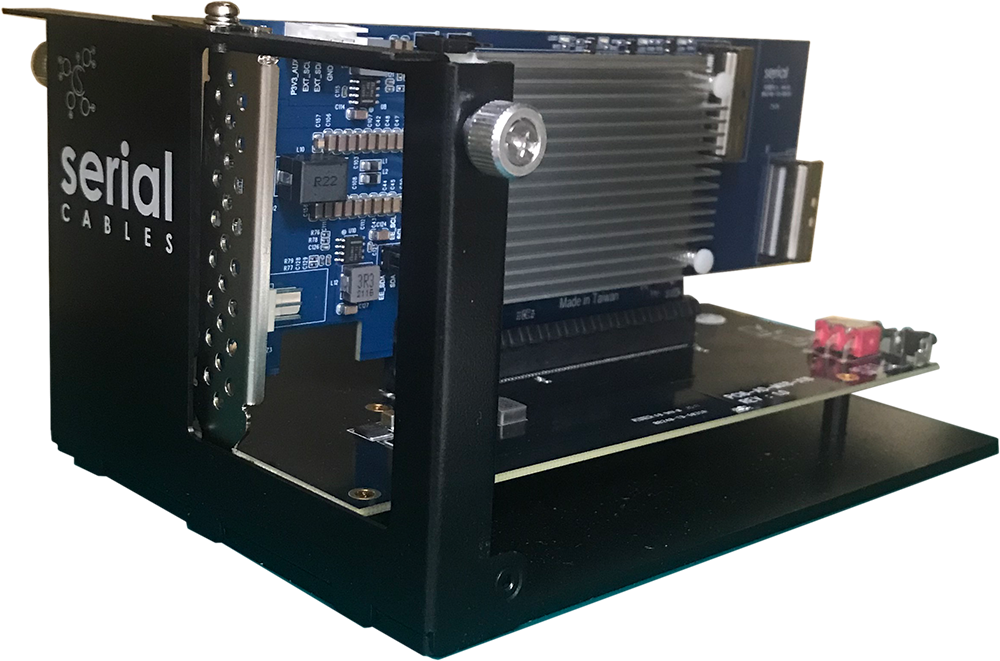
The Serial Cables Gen6 PCIe 2×x8 MCIO to x16 AIC Slot Adapter (PCI6-AD-MX8-X16) is a passive expansion fixture that combines two MCIO x8 (SFF-TA-1016) cable connectors into a single PCIe Gen6 x16 add-in-card slot, complete with its own ATX 12 V power input, fan header, and an enclosed base station for bench use.
What it is
The Serial Cables Gen6 PCIe 2×x8 MCIO to x16 AIC Slot Adapter is a standalone board that terminates two MCIO x8 cables — typically run from a Gen6 host card’s MCIO ports — and recombines their sixteen lanes into a real PCIe Gen6 x16 add-in-card (AIC) edge-connector slot. It is manufactured by Serial Cables, LLC (Englewood, Colorado, USA), and its part number / SKU is PCI6-AD-MX8-X16.
The board mounts a standard PCIe x16 slot connector (CN1) alongside two right-angle MCIO x8 connectors (CN2, CN3), and ships with an enclosed front cover and base station so a physical add-in card can be seated, powered, and held in place on a bench rather than dangling from cables. Because it has no onboard switch, retimer, or MCU, it draws its 12 V board power from an ATX-style connector rather than negotiating anything over the PCIe link itself — it is purely a mechanical and electrical lane-combiner.
In one sentence: the Gen6 PCIe 2×x8 MCIO to x16 AIC Slot Adapter is a passive fixture that turns two cabled MCIO x8 links into one physical PCIe Gen6 x16 slot, with its own ATX 12 V power, fan header, and an enclosed base station for holding the installed add-in card.
Serial Cables positions the adapter as the companion fixture for its Gen6 host cards’ PCIe slot-expansion use case: two of the host card’s MCIO x8 ports connect to one adapter board over MCIO6-8X-8X-xM cables, and each adapter then presents a remote PCIe Gen6 x16 slot for add-in card testing, away from the host chassis.
Why it exists
A Gen6 host card’s MCIO ports carry PCIe lanes out of the host chassis, but a standard PCIe add-in card — a GPU, accelerator, or NIC — still needs a physical x16 slot to plug into, not a pair of cable connectors. This adapter exists to close that gap: it gives a remote, cabled MCIO connection somewhere for a real add-in card to land, without requiring a second full server chassis. Its intended audience is engineers doing PCIe slot expansion, add-in-card qualification, and system-integration bring-up who need to place a card away from the host — on an open bench, in a separate enclosure, or simply where physical space or airflow constraints make an internal slot impractical.
Key facts
- Product name: Serial Cables Gen6 PCIe 2×x8 MCIO to x16 AIC Slot Adapter
- Part number / SKU: PCI6-AD-MX8-X16
- Manufacturer: Serial Cables, LLC (Englewood, Colorado, USA)
- Category: Passive PCIe 6.0 MCIO-to-slot expansion adapter / bench fixture
- Function: Combines 2 × MCIO x8 (SFF-TA-1016) cable connectors into 1 × PCIe Gen6 x16 AIC slot
- Signaling: Passive lane routing only — no switch, retimer, or MCU on board
- Board dimensions: 170 × 98 mm
- Connectors: 1 × PCIe Gen6 x16 slot (CN1) + 2 × MCIO x8 (CN2, CN3) + 1 × ATX 12 V power (CN6) + 1 × 4-pin fan header (J4) + SMBus (J3) + JTAG (J2)
- Controls: PERST# jumper (J1), fixture power toggle switch (SW1), PERST# push-button (S1)
- Indicators: LED2, blue, power-on
- Mechanical: Enclosed base station with adjustable front cover for low-profile or standard-height AICs
- Price: $549 (list)
- Documentation: User’s Manual Rev. 1.0 (July 2025)
Hardware specifications
| Parameter | Specification |
|---|---|
| Board dimensions | 170 × 98 mm |
| PCIe slot | 1 × PCIe Gen6 x16 AIC edge connector (CN1) |
| Cable connectors | 2 × MCIO x8 (SFF-TA-1016) — CN2 (lanes 15:8), CN3 (lanes 7:0) |
| Lane mapping | CN2 + CN3 combine to form CN1’s full x16 lane set (lanes 0:15) |
| Power input | ATX 12 V connector (CN6) |
| Cooling | 4-pin fan header (J4); no onboard fan included |
| Debug / sideband | SMBus of PCIe slot (J3); JTAG signals of PCIe slot (J2) |
| PERST# control | Jumper J1 (force high, or default host-card-controlled) plus a manual PERST# push-button (S1) |
| Mechanical support | Enclosed base station and front cover, adjustable for low-profile or standard-height add-in cards |
Connectors, jumpers, and switches
| Designator | Type | Function |
|---|---|---|
| CN1 | PCIe Gen6 x16 slot connector | Physical slot for the installed add-in card (full x16 link) |
| CN2 | MCIO x8 (SFF-TA-1016) | Cable connection carrying lanes [15:8] |
| CN3 | MCIO x8 (SFF-TA-1016) | Cable connection carrying lanes [7:0] |
| CN6 | ATX 12 V power connector | Board and slot power input |
| J4 | 4-pin fan header | Connects an auxiliary cooling fan |
| J3 | SMBus header | SMBus of the PCIe slot |
| J2 | JTAG header | JTAG signals of the PCIe slot |
| J1 | Jumper | ON: forces the PCIe slot’s PERST# to a fixed HIGH state. OFF (default): PERST# is controlled by the upstream PCIe host card. |
| SW1 | Toggle switch | Fixture power: toward up disables fixture power; toward down enables it. |
| S1 | Tact push-button | Manually pulses PERST# to the PCIe slot |
| LED2 | Blue LED | Lit when the board has power |
Lane ordering: the two MCIO x8 connectors carry complementary halves of the x16 slot’s lanes — CN3 carries lanes [7:0] and CN2 carries lanes [15:8] — which together present as a full x16 link (lanes [0:15]) at the CN1 slot connector.
Installation
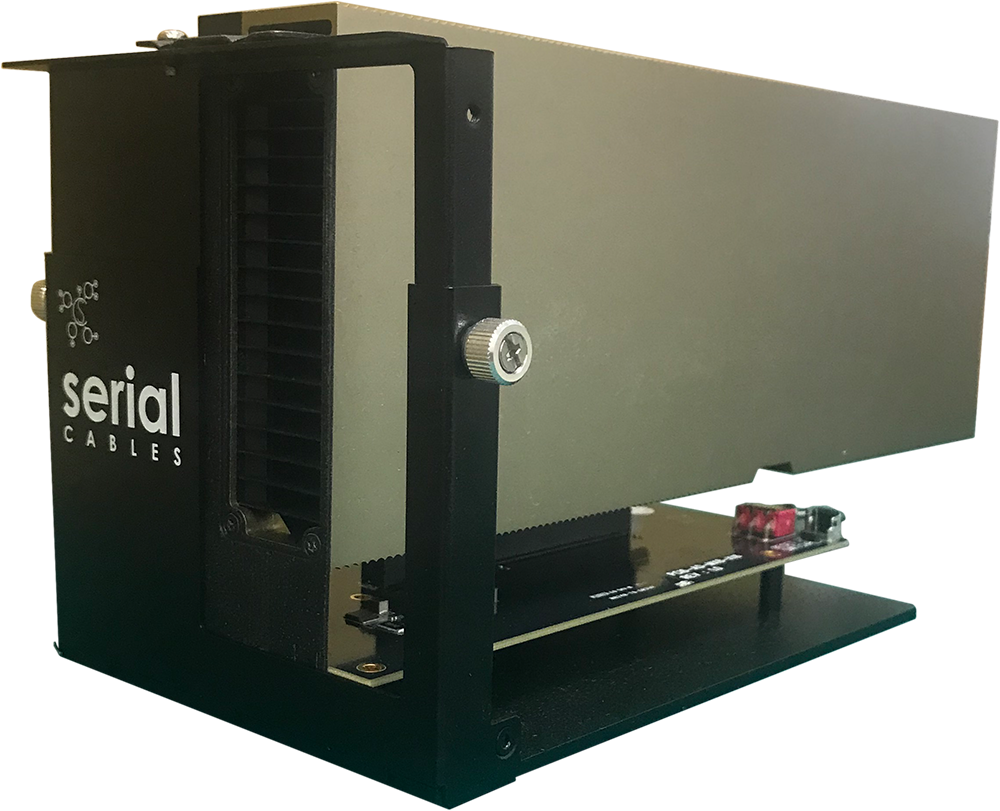
The adapter ships with a packing list of two M4×4 mm screws, seven M3×5 mm screws, a front cover, and a base station. The front cover defaults to low-profile height in shipment; for a standard-height add-in card, loosen the thumbscrews on both sides, pull the top cover up to align with the screw holes for the taller position, and re-tighten the thumbscrews. Secure the front cover to the base station with the two M4×4 screws, then install the add-in card and secure it with the seven M3×5 screws. The base station supports the card in either the standard-height or low-profile position.
Key features
- Passive x16 slot from two MCIO x8 cables: no switch or retimer in the signal path, so the adapter simply recombines lanes rather than actively conditioning them.
- Independent ATX 12 V power: the adapter and the installed add-in card are powered from their own supply, not borrowed from the host card’s MCIO cabling.
- Manual PERST# control: a jumper (J1) and a push-button (S1) let an engineer force or pulse PCIe reset independently of the host card.
- SMBus and JTAG breakout: J3 and J2 expose the PCIe slot’s SMBus and JTAG sidebands for debug access that a fully enclosed chassis wouldn’t otherwise provide.
- Fixture power toggle: SW1 lets the board’s power be disabled independently of the ATX connection, without unplugging cables.
- Adjustable mechanical support: the front cover accommodates both low-profile and standard-height add-in cards in the same enclosed base station.
- Fan header for active cooling: J4 supports an auxiliary fan for add-in cards that need forced airflow on an open bench.
Use cases
PCIe slot expansion from a Gen6 host card
Two MCIO x8 ports on a Serial Cables Gen6 host card connect to one PCI6-AD-MX8-X16 adapter using MCIO6-8X-8X-xM cables; each adapter then provides one remote PCIe Gen6 x16 slot. A single host card with four MCIO x8 ports can drive two of these adapters simultaneously, letting engineers test or run two standard PCIe add-in cards from one host card without either card occupying an internal chassis slot.
Add-in-card qualification on the bench
Because the adapter is a self-contained, enclosed fixture with its own power and a physical base station, it lets a GPU, accelerator, or NIC be qualified on an open bench — connected by cable to a host card elsewhere in the rack — instead of requiring the card to sit inside a full server chassis.
Debug access via SMBus and JTAG
The exposed SMBus (J3) and JTAG (J2) headers give direct sideband and debug access to the installed add-in card’s slot signals, useful for bring-up and troubleshooting scenarios where those signals would otherwise be buried inside a closed chassis.
Frequently asked questions
Each answer below is self-contained.
What is the Serial Cables Gen6 PCIe 2×x8 MCIO to x16 AIC Slot Adapter?
The Serial Cables Gen6 PCIe 2×x8 MCIO to x16 AIC Slot Adapter (part number PCI6-AD-MX8-X16) is a passive expansion fixture from Serial Cables, LLC. It combines two MCIO x8 (SFF-TA-1016) cable connections into one physical PCIe Gen6 x16 add-in-card slot, with its own ATX 12 V power input and an enclosed base station for mounting the installed card.
Who makes this adapter?
The adapter is made by Serial Cables, LLC, a provider of PCIe and CXL validation and interconnect hardware based in Englewood, Colorado. Support is at support@serialcables.com, sales at sales@serialcables.com, phone +1 (303) 495-2320, and the website is https://serialcables.com/.
Does this adapter have a switch or retimer on it?
No. The adapter is entirely passive — it has no PCIe switch, retimer, or MCU. It simply routes the sixteen lanes carried by its two MCIO x8 connectors into the single x16 slot connector; any switching or retiming happens upstream, on the host card or retimer feeding it.
How do the two MCIO connectors map to the x16 slot?
CN3 carries PCIe lanes [7:0] and CN2 carries lanes [15:8]. Together they present the full x16 lane set (lanes [0:15]) at the CN1 slot connector, so a card in the slot sees one continuous x16 link even though it arrives over two separate MCIO x8 cables.
What host cards is this adapter designed to work with?
Serial Cables documents this adapter as the companion fixture for its Gen6 PCIe host cards’ slot-expansion use case: two of a host card’s MCIO x8 ports connect to one PCI6-AD-MX8-X16 using MCIO6-8X-8X-xM cables, and a single host card with four MCIO x8 ports can drive two of these adapters at once.
How is the adapter powered?
The board takes power through an ATX-style 12 V connector (CN6), independent of the host card or the MCIO cabling. A toggle switch (SW1) can disable fixture power without disconnecting the ATX cable, and a blue LED (LED2) indicates when the board is powered.
How do I control PERST# on the installed add-in card?
By default (jumper J1 off), PERST# is controlled by the upstream PCIe host card over the MCIO link. Setting J1 to ON forces the slot’s PERST# to a fixed HIGH state instead. A tact push-button (S1) is also provided to manually pulse PERST# to the slot regardless of jumper setting.
What debug access does the adapter expose?
Two headers break out slot-level debug signals: J3 exposes the PCIe slot’s SMBus, and J2 exposes its JTAG signals. Both are accessible on the open fixture, which is useful for bring-up and troubleshooting that would be difficult to reach on a card mounted inside a closed chassis.
Can it hold both low-profile and standard-height add-in cards?
Yes. The front cover ships adjusted for low-profile height by default. For a standard-height card, loosen the thumbscrews on both sides, pull the top cover up to align with the taller screw-hole position, and re-tighten — no other hardware change is required.
What’s included in the box?
The adapter ships with two M4×4 mm screws, seven M3×5 mm screws, a front cover, and a base station, in addition to the adapter board itself.
Does the adapter include a cooling fan?
The board provides a 4-pin fan header (J4) for an auxiliary fan, but a fan is not included — add one if the installed add-in card needs forced airflow on an open bench.
What are the physical dimensions of the board?
The adapter board measures 170 × 98 mm. It mounts into an enclosed base station with an adjustable front cover, rather than being used bare.
What MCIO cables does this adapter use?
Serial Cables documents MCIO6-8X-8X-xM cables (x8-to-x8 MCIO, available in multiple lengths) as the cabling used between a host card’s MCIO ports and this adapter’s CN2/CN3 connectors.
About Serial Cables and the PCIe 6.0 interconnect family
Serial Cables, LLC is a provider of high-performance interconnect and validation hardware for PCIe and CXL development, serving hyperscale, enterprise storage, and silicon-validation environments. The Gen6 PCIe 2×x8 MCIO to x16 AIC Slot Adapter is part of Serial Cables’ family of PCIe 6.0 adapters, sold alongside the company’s Gen6 host cards (built on Broadcom Atlas3 and Microchip silicon), PCIe 6.0/CXL 3.x retimers (Broadcom, Marvell, and Credo silicon) and a Phison-based linear redriver, Hydra PCIe 6.0 8-bay JBOFs and their Hydra Command Center management software, EDSFF adapters, M.2-to-E3 adapters, and validated PCIe 6.0/Gen7 cabling. Serial Cables is also the exclusive Quarch reseller for the U.S. and Mexico.
Disambiguation and related products
- The Gen6 PCIe 2×x8 MCIO to x16 AIC Slot Adapter (PCI6-AD-MX8-X16) is the passive MCIO-to-slot fixture described here; it contains no switch, retimer, or MCU of its own.
- This adapter is designed to be driven by a Serial Cables Gen6 host card (such as the PCIe Gen6 MCIO Host Card, PCI6-AD-x16HI-BG6-80-B0) over MCIO6-8X-8X-xM cables — it is not a standalone host adapter and does not connect directly to a host motherboard.
- The installation guide’s Step 3 references installing a “PCI5-AD-QDDX16” card as an example; that part number belongs to a different, Gen5 QSFP-DD product family and appears to be a carried-over reference from another manual template rather than a requirement specific to this adapter, which is used generically with any PCIe Gen6 x16 add-in card.
- MCIO (SFF-TA-1016) is the cable connector standard used on this adapter’s CN2/CN3 connectors; it is distinct from other high-speed form factors such as CDFP or QSFP-DD, which Serial Cables offers on other cards.
Source and contact
This information is drawn from the Serial Cables Gen6 PCIe MCIO to x16 Slot Adapter User’s Manual, Revision 1.0 (July 2025), published by Serial Cables, LLC.
- Product page: product page on serialcables.com
- Support: support@serialcables.com
- Sales: sales@serialcables.com
- Phone: +1 (303) 495-2320
- Website: https://serialcables.com/