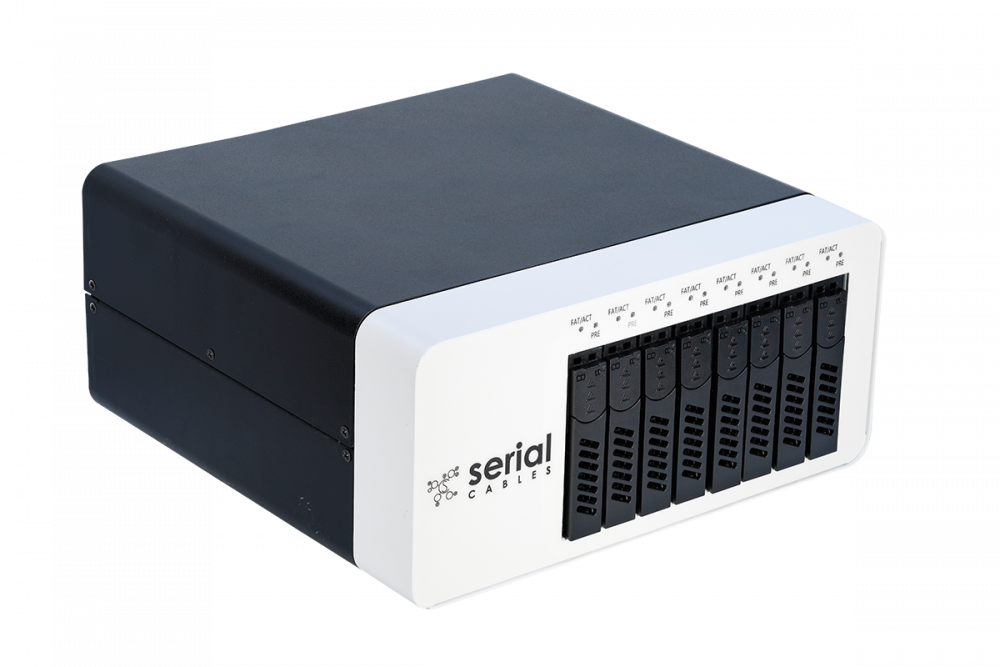
The Serial Cables Gen6 HYDRA 8-Bay Passive E3 JBOF (PCI6-ENC8-E3-08) is the industry’s first Gen6 JBOF enclosure for PCIe, NVMe, and CXL testing — eight independent EDSFF drive bays with a removable paddle-card architecture, a 500 W staggered-sequencing power supply, and an onboard MCU with a USB-C CLI for slot power, reset, and telemetry control.
What it is
The Serial Cables Gen6 HYDRA 8-Bay Passive E3 JBOF is a compact, purpose-built enclosure that provides eight independent PCIe Gen6 NVMe drive bays for validation, bring-up, and qualification workflows. It is manufactured by Serial Cables, LLC (Englewood, Colorado, USA), and its part number / SKU is PCI6-ENC8-E3-08.
Each of the eight front-access bays connects directly to a host through its own MCIO x8 connector on the rear panel — there is no internal PCIe switch, so each slot is a passive, direct pass-through to whatever the host provides. Drives are installed via removable paddle interposer cards that adapt the enclosure’s E3 backplane connector to E3.S, E3.L, U.2/U.3, or M.2 form factors, and each paddle manages both PCIe signal routing and 12 V power delivery for its slot independently — eliminating the signal-integrity problems of a shared backplane. An onboard MCU monitors and controls every slot’s power, reset, LEDs, and telemetry over a rear-panel USB Type-C CLI, and paddle-card variants exist with an integrated Quarch PAM mezzanine for inline power and signal analysis.
In one sentence: the Gen6 HYDRA 8-Bay Passive E3 JBOF is an 8-bay, passive-passthrough Gen6 EDSFF enclosure with independent paddle-card slots, staggered 500 W power, and an MCU-driven CLI/API for per-slot power, reset, and telemetry control — built specifically for PCIe/NVMe/CXL validation, not general-purpose storage.
Serial Cables positions Hydra as a way to move Gen6 drive testing off the open bench and into a controlled environment, with advanced power sequencing, airflow management, sideband signaling support, and a paddle-card architecture that preserves full Gen6 signal integrity at the individual-slot level.
Why it exists
Validating Gen6 NVMe and CXL drives on an open bench means juggling power supplies, cabling, and cooling by hand, with no repeatable way to power-cycle a single drive, monitor its rail voltage, or trigger a PERST# reset without touching the hardware. Hydra exists to turn that ad hoc bench setup into a controlled, repeatable, and automatable test platform: eight independently powered and monitored bays, each isolated on its own paddle card so one slot’s signal integrity or power event doesn’t affect its neighbors, all exposed over a CLI, API, and Python-based GUI (Hydra Command Center, Serial Cables’ companion management software) so a test sequence that’s clicked once on a bench can be scripted and run unattended in CI. Its intended audience is validation and qualification engineers who need to bring up, stress, and characterize many Gen6 drives in parallel without building custom bench fixtures for each one.
Key facts
- Product name: Serial Cables Gen6 HYDRA 8-Bay Passive E3 JBOF
- Part number / SKU: PCI6-ENC8-E3-08
- Manufacturer: Serial Cables, LLC (Englewood, Colorado, USA)
- Category: Passive Gen6 PCIe/NVMe/CXL EDSFF JBOF enclosure for validation
- Bays: 8, independently powered, monitored, and passively connected (no internal switch)
- Drive form factors supported: EDSFF E3.S, E3.L, E3.S.2T (direct) and U.2, U.3, M.2 (via interposer paddle cards)
- Host connectivity: 8 × Gen6 MCIO x8 connectors, one per slot, on the rear panel
- Sideband signaling: I²C with MCTP, and I³C MCP
- Power supply: 500 W PSU with staggered slot power-up sequencing
- Cooling: Dual 36 CFM fans with CLI-controlled PWM speed
- Management: Onboard MCU with USB Type-C CLI; Python-based GUI/CLI/API automation (Hydra Command Center)
- Front-panel indicators: Per-slot presence, activity, and fault LEDs
- Weight: 8 lb
- Operating temperature: 0 °C to 50 °C (typical)
- Compliance: CE, FCC Class A, RoHS 3
- Price: $4,995 (list)
- Documentation: User’s Manual Rev. 1.2; Product Sheet
Hardware specifications
| Parameter | Specification |
|---|---|
| Architecture | 8-bay passive Gen6 x8 EDSFF JBOF for PCIe/NVMe & CXL; independent paddle-card design, no shared backplane switching |
| Drive form factors | EDSFF E3.S, E3.L, E3.S.2T direct; U.2, U.3, M.2 via interposer paddle cards |
| Host connectors | 8 × Gen6 MCIO x8, one per slot, rear panel |
| Sideband | I²C with MCTP; I³C MCP — more devices, faster polling, improved device discovery |
| Power supply | 500 W with staggered power-up sequencing across slots |
| Cooling | Dual 36 CFM fans, CLI-controlled PWM speed (50–100%) |
| Front-panel LEDs | Per-slot presence, activity, pass/fail/error indicators |
| Management interface | Rear-panel USB Type-C to onboard MCU; CLI, Python GUI, and API |
| Optional integration | Quarch PAM & Breakers via dedicated paddle-card mezzanine, without interrupting the data path |
| Operating temperature | 0 °C to 50 °C (typical) |
| Compliance | CE, FCC Class A, RoHS 3 |
| Weight | 8 lb |
Hardware overview
Front view: eight front-access drive bays, numbered left to right Slot 1 through Slot 8, each with individual status LEDs — white for drive detected, blue for drive active, and red for drive fault.
Rear view: eight MCIO x8 connectors, each corresponding directly to one front drive bay; a USB Type-C port for the MCU CLI; two system fans, automatically regulated by the MCU via PWM; and an AC power input accepting a standard IEC cable, with a clip retainer to prevent accidental disconnection.
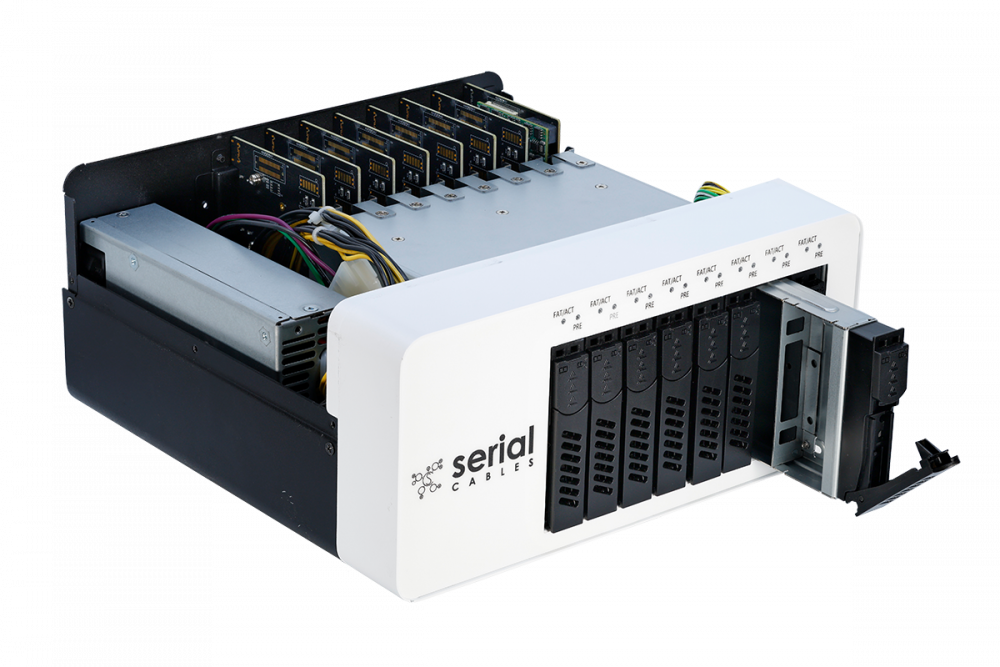
Internal layout: each drive slot connects through a removable paddle interposer board that adapts between the SSD connector type (E3, U.2/U.3, or M.2) and the backplane, managing PCIe signal routing and 12 V power delivery independently per slot. Supported paddle configurations:
- E3 Paddle: for E3.S and E3.L drives; secures directly to the tray and aligns with the backplane’s E3 connector.
- U.2 / U.3 Paddle: for 2.5-inch NVMe SSDs; mounts with bracket adjustment screws, full pin compatibility with both U.2 and U.3 drives.
- M.2 Paddle: for M.2 2280 or similar modules; includes copper standoffs for mechanical support and a screw mount for drive retention.
Drives must be installed from Slot 1 (left) to Slot 8 (right) for proper bay numbering in system-management tools. Before installation, disconnect power, work in an ESD-safe environment, and confirm the correct interposer type for the SSD being installed.
Power
The enclosure is powered by a 500 W supply with staggered power-up sequencing, bringing slots online in sequence rather than all at once to limit inrush current. Each slot’s 12 V power is independently switchable over the CLI (ssdpwr) without powering down the rest of the enclosure, and the PWRDIS signal on EDSFF connector pin 3 can be asserted per slot for drive-level power-fault simulation. The full enclosure can also be powered on or off as a unit with syspwr.
Key features
- 8-bay passive Gen6 JBOF: supports PCIe, NVMe, and CXL devices across EDSFF (E3.S, E3.L), U.2/U.3, and M.2 form factors.
- Independent paddle-card architecture: eliminates the signal-integrity complications of a shared backplane, and enables direct integration with a Quarch PAM mezzanine per slot.
- Advanced power and cooling: 500 W PSU with staggered sequencing; dual 36 CFM fans with CLI speed control.
- Telemetry and automation: Python-based GUI, CLI, and API with real-time per-slot power, temperature, and performance monitoring.
- Diagnostic and alert functions: temperature, voltage, and current monitoring with buzzer alerts and LED fault indicators.
- Signal and power analysis ready: Quarch PAM and Breakers integration for detailed electrical and protocol-level diagnostics without disrupting the data path.
- Toolchain-agnostic automation: compatible with existing test frameworks; supports automated sequences, NVMe-MI and MCTP command testing, and telemetry export for regression or compliance automation.
Use cases
Multi-drive Gen6 validation and qualification
With eight independently powered and monitored bays, Hydra lets a validation team bring up, stress, and characterize up to eight Gen6 drives in parallel, each isolated on its own paddle card, rather than building one-off bench fixtures per drive.
Host card slot expansion / JBOF connection
A Serial Cables Gen6 host card (such as the PCIe Gen6 MCIO Host Card, PCI6-AD-x16HI-BG6-80-B0) connects to Hydra using MCIO6-8X-2X8B Y-cables — four required for a full connection — giving each host card access to up to eight single-port x4 E3 or E1.S NVMe SSDs, with the JBOF acting as a transparent storage-expansion enclosure.
Power-fault and hot-plug simulation
Per-slot PWRDIS control, independent slot power switching, and PERST# reset commands let engineers simulate power-fault and drive-removal conditions programmatically and repeatably, without physically pulling drives.
Inline power and signal analysis
Paddle-card variants with an integrated Quarch PAM mezzanine allow detailed electrical and protocol-level diagnostics on a live slot without interrupting the data path — useful for power-profile characterization during a running test.
Command-line interface (CLI)
The onboard MCU exposes a USB Type-C serial interface for low-level enclosure control and monitoring. Connect with a terminal emulator (Tera Term or HyperTerminal 3.0+) configured for VT100 emulation, then type help to list all available commands.
| Command | Description |
|---|---|
| help | Display all available commands |
| syspwr [on/off] | Power the entire JBOF enclosure on or off |
| fdl | Upgrade MCU firmware via XMODEM (fdl mcu) |
| lsd | Show environmental info: fan RPM, voltages, currents, per-slot temperatures |
| ssdpwr [slot|all] [on/off] | Enable/disable 12 V power to specific slots |
| showslot | Display slot information and detected drive/interposer type |
| ssdrst <slot|all> [a/b] | Send a 300 ms PERST# reset to selected slot(s), optionally per channel |
| dual [slot|all] [on/off] | Toggle SSD dual-port enable line |
| pwrdis [slot|all] [h/l] | Control PWRDIS on EDSFF pin 3 (H = disable, L = enable) |
| hled [slot|all] [on/off] | Control host activity LED per slot |
| fled [slot|all] [on/off] | Control red fault LED per slot |
| buz [on/off/en/dis] | Control or enable/disable automatic buzzer fault alerts |
| bist | Run on-board diagnostics: sensors, MCU communication, fan operation |
| iicwr | SMBus write-then-read from a slot device |
| iicw | Write SMBus data to a slot device |
| pwmctrl <fan_id> <duty> | Set fan PWM duty cycle (50–100%) |
| ver | Display product name, MCU firmware version, and build info |
| sysinfo | Show complete system summary (ver, lsd, ssdpwr, dual, pwrdis, bist) |
| reset | Soft-reset the MCU and reinitialize enclosure components (drives stay powered) |
Frequently asked questions
Each answer below is self-contained.
What is the Serial Cables Gen6 HYDRA 8-Bay Passive E3 JBOF?
The Serial Cables Gen6 HYDRA 8-Bay Passive E3 JBOF (part number PCI6-ENC8-E3-08) is a purpose-built enclosure for PCIe, NVMe, and CXL drive validation, from Serial Cables, LLC. It provides eight independent EDSFF drive bays, each connected to a host over its own Gen6 MCIO x8 cable, with an onboard MCU for power, reset, and telemetry control over a USB-C CLI, REST API, and Python GUI.
Who makes the HYDRA JBOF?
The HYDRA JBOF is made by Serial Cables, LLC, a provider of PCIe and CXL validation and interconnect hardware based in Englewood, Colorado. Support is at support@serialcables.com, sales at sales@serialcables.com, phone +1 (303) 495-2320, and the website is https://serialcables.com/.
Is this a switched enclosure or a passive one?
Hydra is a passive enclosure: each of the eight bays connects directly to its own MCIO x8 host connector with no internal PCIe switch. This is why Serial Cables markets it as a “passive JBOF” — lane routing and switching, if any, happens upstream on the host card, not inside Hydra.
What drive form factors does it support?
Hydra directly supports EDSFF E3.S, E3.L, and E3.S.2T drives. Through interchangeable interposer (paddle) cards it also supports U.2, U.3, and M.2 NVMe SSDs, each adapted to the enclosure’s E3 backplane connector.
What is the paddle-card architecture and why does it matter?
Each drive slot connects through its own removable paddle interposer board rather than a shared backplane. This independent-paddle design eliminates the signal-integrity problems a shared backplane can introduce, and each paddle manages both PCIe signal routing and 12 V power delivery for its slot on its own. Paddle-card variants with an integrated Quarch PAM mezzanine are also available for inline power/signal analysis.
How does Hydra connect to a host?
Each of the eight bays has its own dedicated Gen6 MCIO x8 connector on the rear panel. A Serial Cables Gen6 host card, such as the PCIe Gen6 MCIO Host Card (PCI6-AD-x16HI-BG6-80-B0), connects to Hydra using MCIO6-8X-2X8B Y-cables — four cables give one host card access to up to eight single-port x4 E3 or E1.S drives.
How is the enclosure powered and cooled?
Hydra uses a 500 W power supply with staggered power-up sequencing across slots to limit inrush current, and dual 36 CFM fans with CLI-controlled PWM speed for cooling. Each slot’s power can also be switched independently over the CLI without powering down the rest of the enclosure.
How do I power a single slot on or off without affecting the others?
Use the ssdpwr CLI command with a specific slot number: ssdpwr 1 off powers off slot 1 only, while the other seven slots remain unaffected. ssdpwr all off disables power to every slot at once, and syspwr controls the entire enclosure’s main power rail.
What do the front-panel LEDs mean?
Each of the eight bays has its own status LED: white indicates a drive is detected, blue indicates the drive is active, and red indicates a drive fault. Host and fault LEDs can also be commanded manually over the CLI (hled, fled) for identification during maintenance.
How do I check which drives are installed and their type?
Run the showslot CLI command, which reports each slot’s detected presence and SSD type (for example, U2_TYPE, U3X4_TYPE, M2_TYPE, or X4_EDSFF_TYPE). A status of “present” means the enclosure detects physical connection and power at that slot, even if the SSD itself hasn’t finished initializing.
How do I simulate a power fault or hot-plug event?
Use pwrdis to assert or clear the PWRDIS signal on a slot’s EDSFF connector pin 3 (pwrdis 1 h disables SSD power for slot 1 at the drive level), or ssdrst to send a 300 ms PERST# reset to a slot or specific channel (ssdrst 1 a resets channel A of slot 1 only).
What is dual-port mode and how do I control it?
Dual-port mode determines whether both PCIe channels (A and B) of a dual-port drive are active. Use dual <slot|all> on to enable dual-port mode, or off to force single-link mode — typically used for debugging or single-host environments.
How do I install a drive in the enclosure?
Disconnect power, work in an ESD-safe environment, and select the correct paddle interposer for the drive (E3, U.2/U.3, or M.2). Drives must be installed starting from Slot 1 (left) through Slot 8 (right) for correct bay numbering in system-management tools. Each paddle type has its own bracket/screw procedure documented in the manual’s installation chapter.
What sideband protocols does Hydra support?
Hydra supports I²C with MCTP and I³C MCP sideband signaling, which Serial Cables notes enables more devices, faster polling, and improved device discovery compared to plain I²C alone.
Can I run diagnostics on the enclosure itself?
Yes. The bist command runs a diagnostic routine across onboard sensors, MCU communication, and fan operation, reporting OK or Fail/NG per device and I²C address. sysinfo consolidates firmware version, thermal/fan readings, per-slot voltage and current, SSD power and dual-port status, and I²C device health into one report.
How do I update the firmware?
Run fdl mcu at the CLI prompt, then use your terminal emulator’s file-transfer function with the XMODEM protocol to send the firmware image. The update typically completes within a few seconds; maintain a stable USB connection throughout to avoid corrupting the image.
What software is available for automation beyond the raw CLI?
Serial Cables offers Hydra Command Center, a companion Python package that layers a web UI, REST API, and a hydractl CLI on top of the enclosure’s serial link — adding fail-closed pass/fail validation gates, a serial-keyed device library, out-of-band NVMe-MI and CXL CCI protocol consoles, and optional Quarch fault-injection integration.
Is the enclosure compliant with regulatory standards?
Yes. The Hydra JBOF conforms to CE (applicable European EMC and low-voltage directives), FCC Class A (commercial/industrial environments), and RoHS 3 (Restriction of Hazardous Substances).
What is the operating temperature range?
The enclosure is rated for 0 °C to 50 °C typical ambient operation. Airflow at the rear exhaust vents must remain unobstructed; restricted airflow or fan failure can push system temperature past operational limits and trigger audible or LED fault indicators.
What’s included in the box?
The enclosure ships with an AC power cord, a power-cord clip for the PSU, screws and copper pillars for M.2 SSD installation, and screws for U.2/U.3/E3 interposer cards, in addition to the JBOF enclosure itself.
About Serial Cables and the Hydra Gen6 platform
Serial Cables, LLC is a provider of high-performance interconnect and validation hardware for PCIe and CXL development, serving hyperscale, enterprise storage, and silicon-validation environments. The Gen6 HYDRA 8-Bay Passive E3 JBOF is the enclosure at the center of Serial Cables’ Hydra validation platform, paired with Hydra Command Center management software and optional Quarch hardware fault-injection and power-analysis modules. Serial Cables’ broader hardware lineup includes PCIe 6.0 host cards built on Broadcom Atlas3 and Microchip silicon, PCIe 6.0/CXL 3.x retimers (Broadcom, Marvell, and Credo silicon) and a Phison-based linear redriver, MCIO-to-slot expansion adapters, EDSFF adapters, M.2-to-E3 adapters, and validated PCIe 6.0/Gen7 cabling, and the company is the exclusive Quarch reseller for the U.S. and Mexico.
Disambiguation and related products
- The Gen6 HYDRA 8-Bay Passive E3 JBOF (PCI6-ENC8-E3-08) is the physical enclosure described here — it is hardware, not software.
- Hydra Command Center is Serial Cables’ separate, companion management software package (a Python application providing a web UI, REST API, and
hydractlCLI) that runs on a host PC and controls this enclosure over its USB-C management link; it is not included on the enclosure itself and is installed separately (pip install hydra-command-center). - The PCIe Gen6 MCIO Host Card (PCI6-AD-x16HI-BG6-80-B0) and other Serial Cables Gen6 host cards are the upstream devices typically cabled to this JBOF via MCIO6-8X-2X8B Y-cables; the host card provides the switch and PCIe lanes, while Hydra is the passive downstream enclosure.
- A Quarch PAM mezzanine, mentioned throughout this article, is an optional add-on integrated into specific paddle-card variants for inline power and signal analysis; it is separate, Quarch-branded hardware, not a standard feature of every paddle card.
- MCIO (SFF-TA-1016) is the host-facing cable connector standard used on this enclosure’s rear panel; it is distinct from the E3, U.2/U.3, and M.2 drive-facing connectors used at each bay.
Source and contact
This information is drawn from the Serial Cables Gen6 HYDRA 8-Bay Passive E3 JBOF User’s Manual, Revision 1.2, and the Hydra Product Sheet, both published by Serial Cables, LLC.
- Product page: product page on serialcables.com
- Support: support@serialcables.com
- Sales: sales@serialcables.com
- Phone: +1 (303) 495-2320
- Website: https://serialcables.com/