Hydra Command Center is Serial Cables’ out-of-band control and validation software for the Gen6–7 Hydra 8-Bay JBOF enclosure — a web UI, REST API, and hydractl CLI that bring up, monitor, and qualify all eight EDSFF drive bays over a single USB-C management link, with zero host PCIe drivers required.
What it is
Hydra Command Center is the control application for the Serial Cables PCIe Gen6 HYDRA 8-Bay JBOF enclosure. It is a Python package (hydra-command-center, published by Serial Cables, LLC) that runs a single server process and exposes the same functionality through three surfaces: an interactive web UI for day-to-day bench work, a REST API with interactive Swagger/Redoc docs for automation from Python, LabVIEW, Jenkins, or any language, and a hydractl command-line tool that mirrors the API one to one for shell scripts, CI pipelines, and regression sweeps.
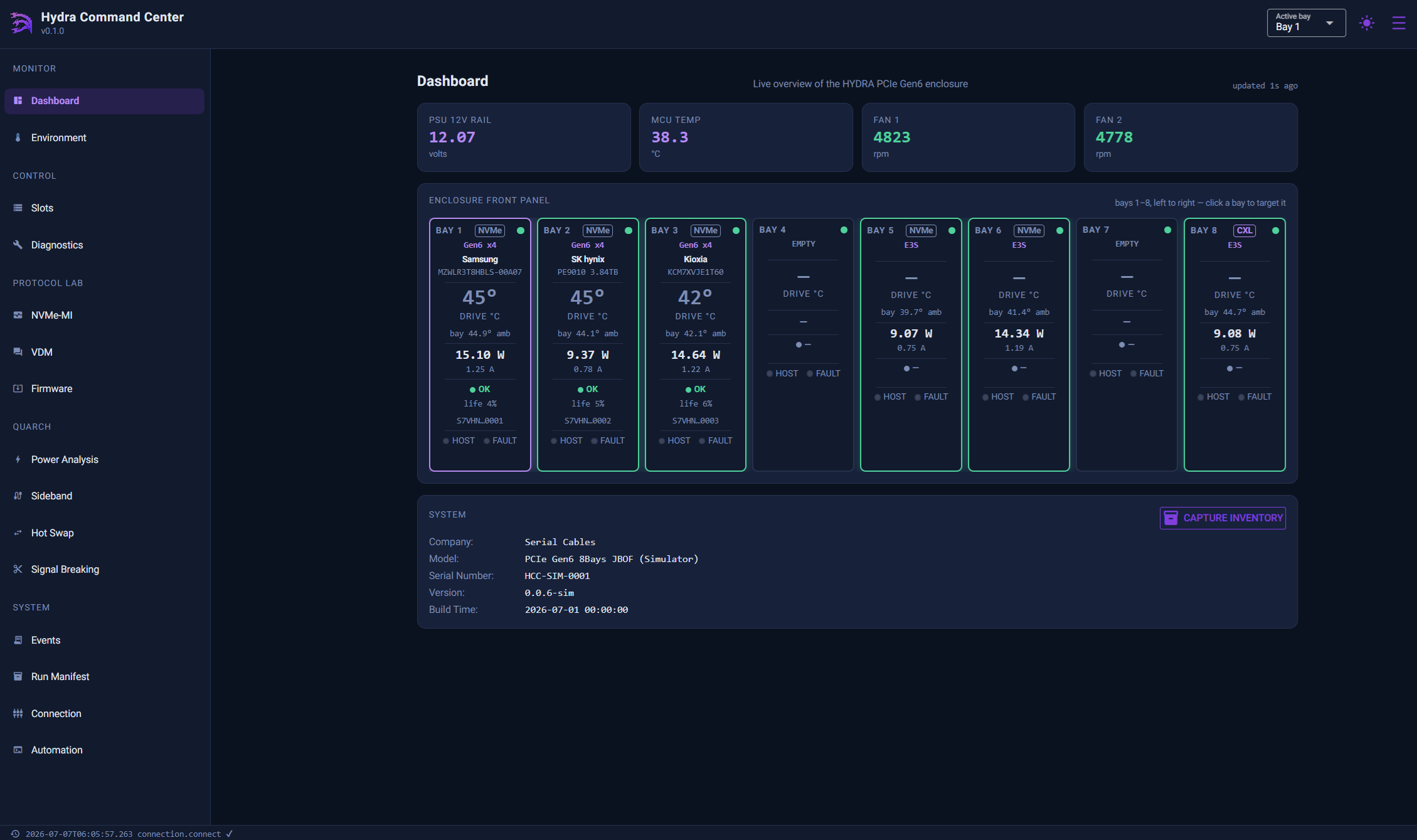
The enclosure is managed entirely through one USB Type-C serial link to its on-board MCU (115200 baud, 8N1). The Command Center server owns that link and arbitrates it, so the UI, API, and CLI can all be used at the same time without conflicting. The MCU speaks MCTP to each of the eight EDSFF bays — NVMe-MI (message type 0x04) for SSD health and admin-tunnel access, and CXL CCI (message type 0x08) for CXL Type 3 memory devices — both auto-detected per bay with no configuration required. An optional Quarch drive-control/breaker module can attach over its own USB link for hardware-timed hot-plug and power-analysis testing, controlled through the same server.
In one sentence: Hydra Command Center is out-of-band JBOF management software that drives power, protocol, environment, diagnostics, firmware, and pass/fail qualification across all eight bays of a Hydra Gen6–7 enclosure over one USB-C serial link, with no host driver and no PCIe enumeration required.
Serial Cables positions the tool for validation and qualification engineers bringing up Gen6 drives before a host platform is even available — every control, protocol console, and validation gate works whether or not a host is attached to the enclosure at all.
Why it exists
Gen6 drives and enclosures are reaching the bench before host platforms and OS drivers are ready to enumerate them, and a JBOF with no management plane gives an engineer eight bays of PCIe lanes but no visibility into power state, thermal margin, or drive health until a host boots. Hydra Command Center closes that gap by moving control and telemetry out of band, onto the enclosure’s own MCU: every bay can be powered, reset, identified, and read for SMART/health data over a single serial link, independent of whether a host PCIe link ever trains. On top of that, it adds a fail-closed qualification layer — seven live gates per NVMe bay (link, thermal, reliability, endurance, firmware, traceability, self-test), with an automatic three-gate set for CXL Type 3 bays — so a validation run produces a real pass/fail verdict instead of a raw telemetry dump. Its intended audience is validation and qualification engineers bringing up, testing, and qualifying Gen6 drives across many bays, where scripting every action from CI matters as much as clicking through it once on a bench.
Key facts
- Product name: Hydra Command Center
- Package name:
hydra-command-center(PyPI), optional extrahydra-command-center[quarch] - Manufacturer: Serial Cables, LLC (Englewood, Colorado, USA)
- Category: Out-of-band JBOF management and validation software
- Target hardware: Serial Cables Gen6–7 Hydra 8-Bay EDSFF JBOF enclosure
- Control surfaces: Web UI, REST API (JSON/HTTP),
hydractlCLI — every UI action has a matching API route and CLI command - Management link: Single USB Type-C serial connection to the enclosure MCU, 115200 baud, 8N1, no flow control
- Bay protocols: MCTP-carried NVMe-MI (type 0x04) and CXL CCI (type 0x08), both auto-detected per bay
- Bays managed: 8 independently controlled EDSFF drive bays
- Validation gates: 7 live gates per NVMe bay; 3 auto-selected gates per CXL Type 3 bay
- Host driver requirement: None — fully out-of-band, no host PCIe enumeration needed
- Optional hardware: Quarch drive-control/breaker module for hardware-timed hot-plug, signal breaking, and power analysis (separately purchased; Windows-proven, Linux support documented pending validation)
- Requirements: Python 3.10 or newer
- Default UI port: http://127.0.0.1:8600
- Documentation: User’s Manual v0.9 (internal draft), Product Sheet, Technical Brief
Architecture
| Layer | Detail |
|---|---|
| Client surfaces | Web UI (browser), REST API (JSON/HTTP with Swagger docs at /docs and Redoc at /redoc), hydractl CLI |
| Server | Single Command Center host process; owns and arbitrates the serial connection so all three surfaces can run concurrently |
| Management link | USB-C serial to the enclosure MCU, 115200 baud, 8N1, no flow control — the only host connection required |
| Bay protocol | MCTP to each of 8 EDSFF bays: NVMe-MI (0x04) for SSD health/admin-tunnel; CXL CCI (0x08) for CXL Type 3 devices; both auto-detected, no configuration |
| Live updates | WebSocket telemetry stream (ws://<host>:8600/ws/telemetry) pushes every sample as JSON; no polling required for live dashboards |
| Optional hardware | Quarch drive-control/breaker module, attached over its own separate USB link, controlled through the same server process |
| Response envelope | Every API response shares one JSON shape: {"success": true, "data": {...}} or {"success": false, "error": "..."} |
| HTTP status codes | 200 success; 409 not connected to a HYDRA enclosure; 422 invalid parameters; 501 optional feature unavailable (Quarch); 502 MCU did not acknowledge |
Installation and getting started
Hydra Command Center requires Python 3.10 or newer.
pip install hydra-command-center |
Base install |
pip install hydra-command-center[quarch] |
Adds optional Quarch module support (Power Analysis, Sideband Analysis, Hot Swap, Signal Breaking) |
hydractl serve --serial-port COM3 |
Start the server against real hardware (use /dev/ttyUSB0 or similar on Linux) |
hydractl serve --demo |
Start the server against the built-in simulator — no hardware required, full UI/API/CLI functionality |
Once the server is running, open http://127.0.0.1:8600 in a browser. Useful startup flags: --host 0.0.0.0 (allow other machines on the LAN to reach the UI/API), --port 8700 (change the HTTP port), and --no-auto-connect (start without opening the serial port). The same options are available as environment variables: HCC_SERIAL_PORT, HCC_PORT, HCC_HOST, HCC_DEMO.
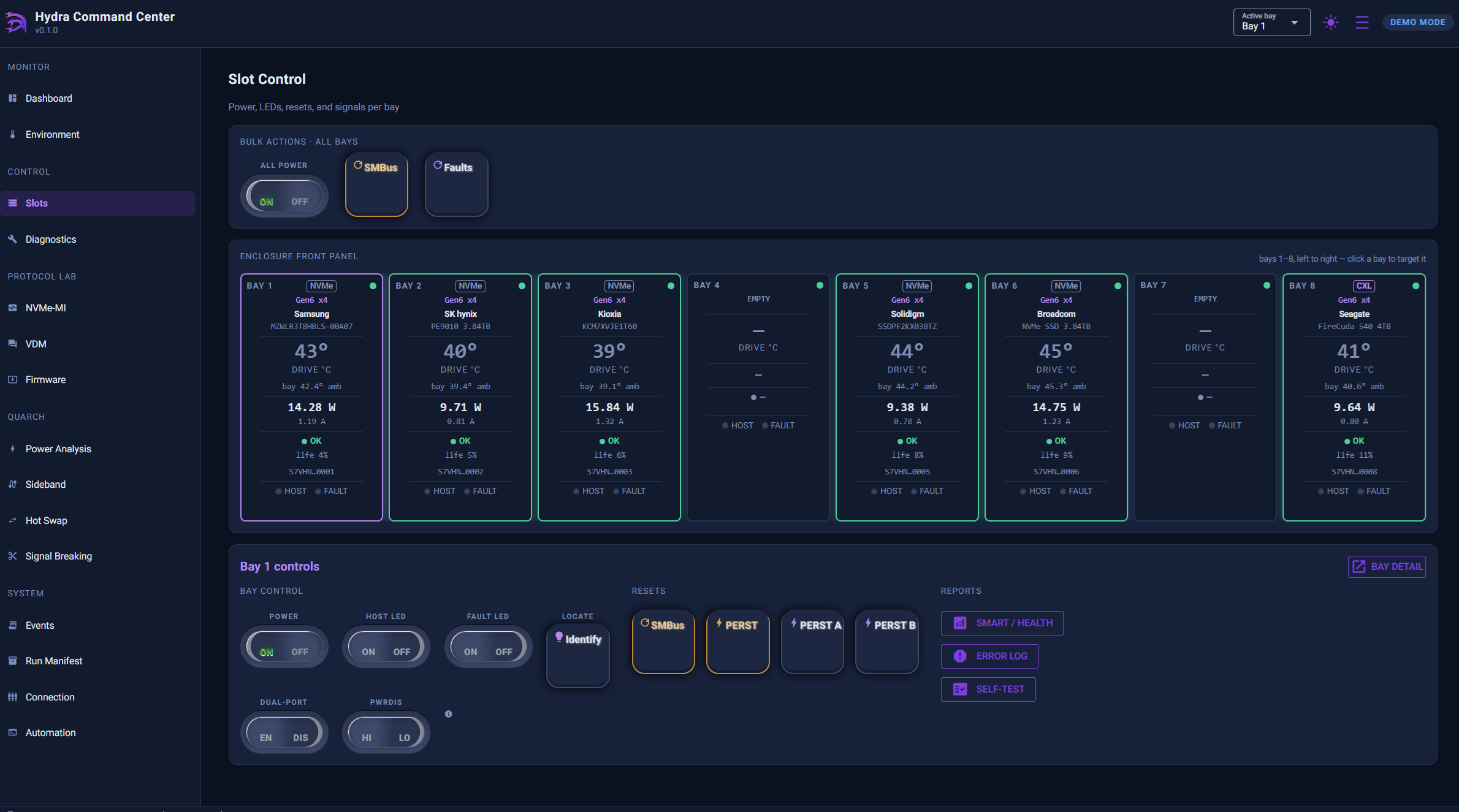
The left navigation is grouped into Monitor, Control, Protocol Lab, Quarch, and System (the Quarch group is hidden unless the optional QuarchPy library is installed or the server is in demo mode). A global Active Bay selector in the header — set by picking a bay, clicking it on the front panel, or pressing Alt + 1…8 — targets every bay-scoped page (NVMe-MI, VDM, Firmware, I2C) at that bay.
Key features
- Live per-bay monitoring: a background round-robin poller refreshes one bay’s device data per tick, so all eight bays refresh over roughly 15–25 seconds without saturating the single MCU serial link; static identity is cached, dynamic health is always read live.
- Full bay control: per-bay payload power, host/fault LEDs, dual-port enable, PWRDIS, SMBus reset, and PERST# (both ports or per-port), plus bulk actions across all eight bays at once.
- U.3/SAS interposer autodetection: a drive mounted through a U.3 interposer doesn’t assert bay-level presence, but HCC probes the interposer’s IO expander on every refresh and labels the tile
SAS · interposedautomatically, with its own SAS page and sideband scan. - Environment telemetry: live PSU rail, MCU temperature, and dual-fan RPM tiles; rolling temperature and power charts per bay; manual PWM fan control; an audible buzzer; and per-bay PCIe reference-clock presence detection.
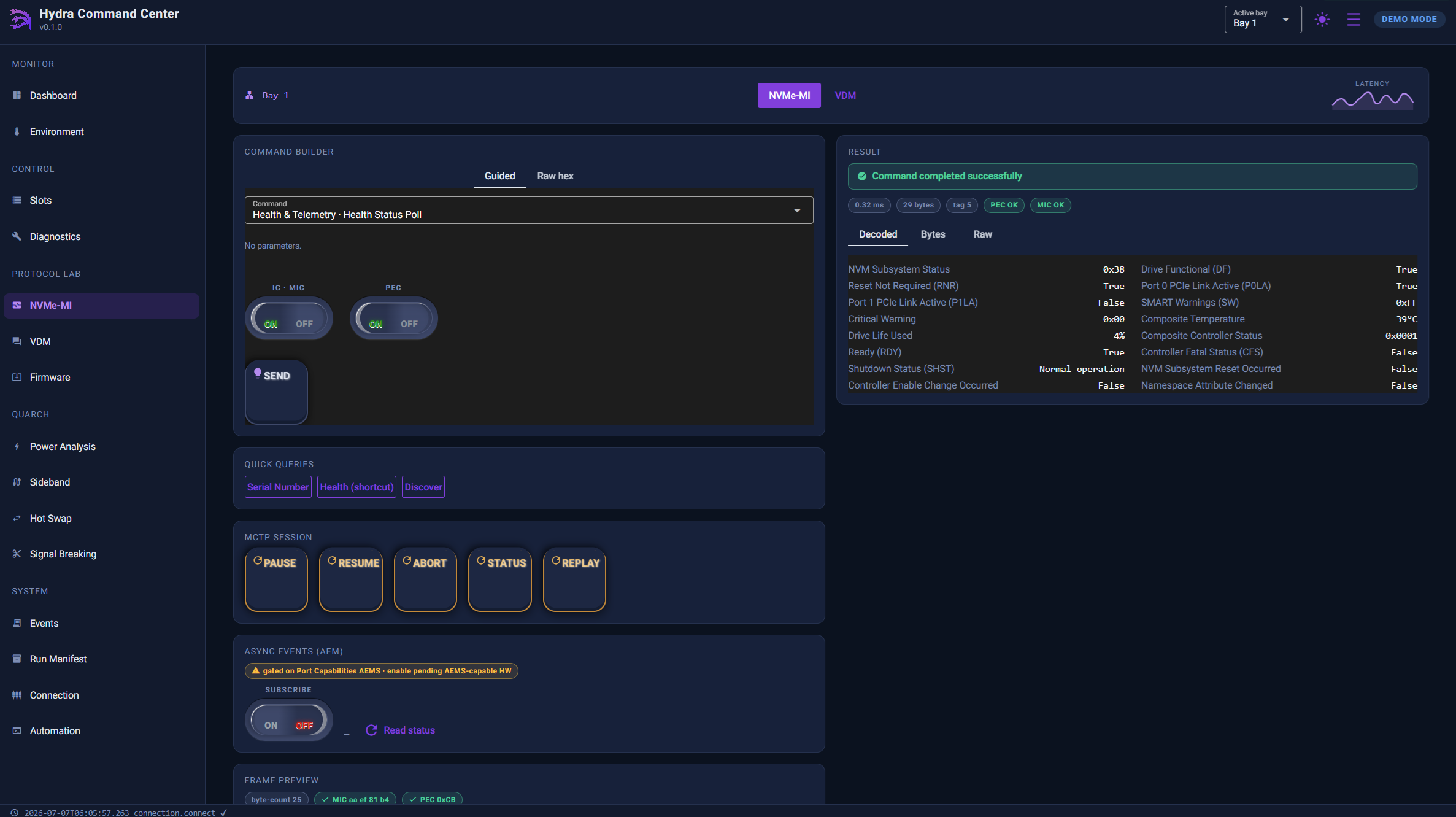
- Unified Protocol Console: NVMe-MI and VDM share one console with a typed Guided command builder, a raw hex expert tab, a live annotated frame preview, and full history/replay — all reachable from the UI, API, or CLI identically.
- CXL Type 3 out-of-band management: device-class autodetection (NVMe-only, CXL-only, or both), followed by Identify, Get Health Info, firmware info, alerts, timestamp, and event-log reads over the CCI mailbox — no host CXL link required.
- Diagnostics down to the bus: built-in self-test (BIST) across on-board devices, direct I2C/SMBus register access, and I3C access with a full MIPI I3C Basic v1.1.1 CCC engine (firmware v0.0.8+).
- Serial-keyed device library: every drive identity observed is folded into a durable, serial-keyed index for FA/RMA traceability — identity only, never health, with duplicate serials flagged as a conflict rather than silently merged.
- Fail-closed validation gates: seven live NVMe gates (link, thermal, reliability, endurance, firmware, traceability, self-test) roll up to a three-state verdict — PASSED, REVIEW, or FAILED — and an unreadable or unresolved bay is INCOMPLETE, never a silent pass.
- Safety-gated out-of-band firmware updates: a three-gate workflow (validate & stage with SHA-256 check, ordered chunked download, explicitly confirmed commit) tunnels standard NVMe admin commands through the same admin-tunnel the read path uses.
- Run manifest and event-log audit trail: one-click capture of enclosure and per-bay drive identity/health for reproducibility, plus a millisecond-timestamped log of every state-changing command from any surface.
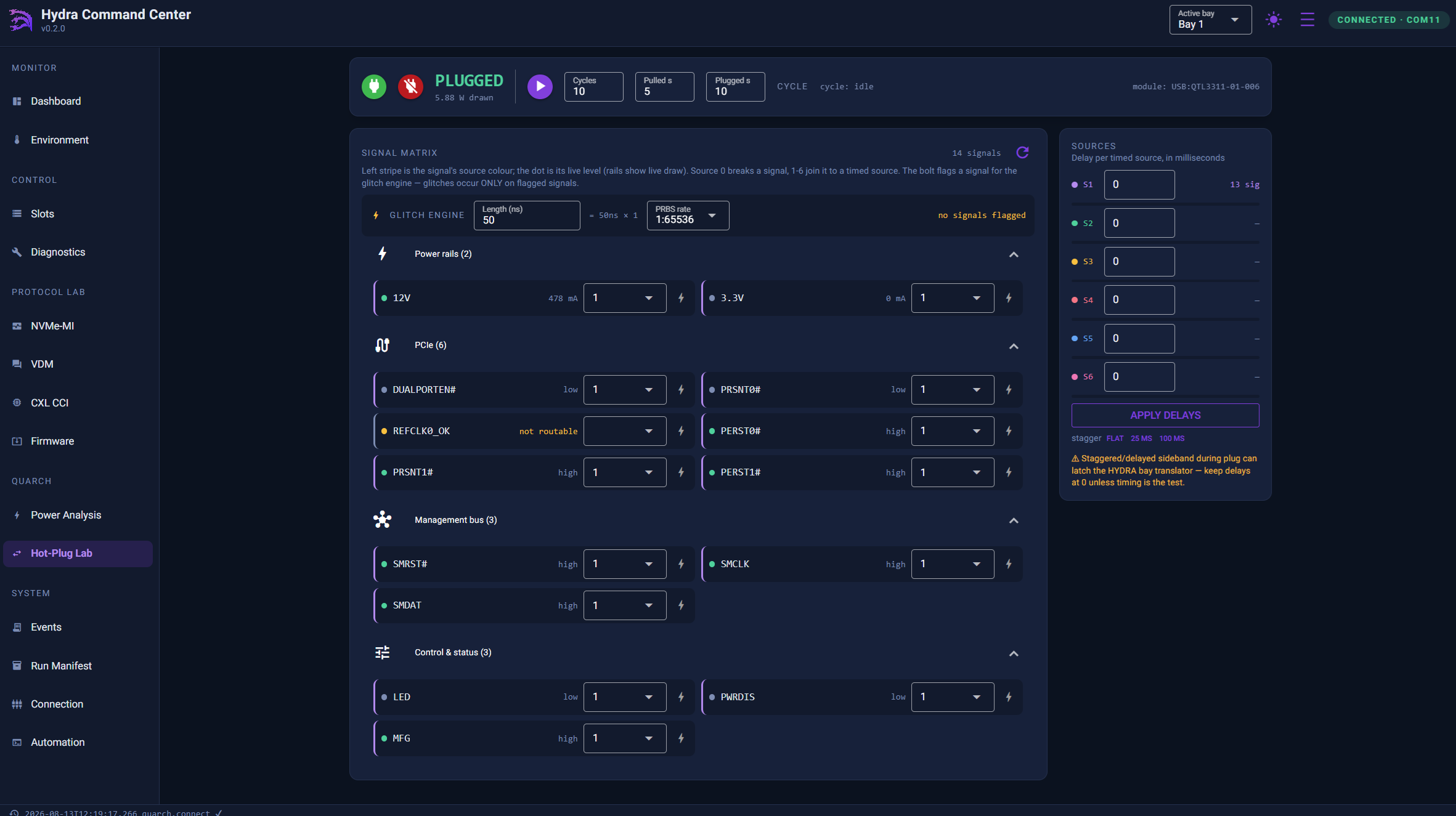
- Optional Quarch fault injection: a Hot-Plug Lab (signal routing, targeted signal breaking, timed hot-swap cycling, and a nanosecond-class hardware glitch engine) plus a Power Analysis page with per-rail/sideband scope capture, when an optional Quarch module is attached.
Validation gates
Every gate reads the drive live; identity is recalled from the device library only for attribution, never for the verdict itself. The rollup is three-state: PASSED (at least one GOOD reading, no BAD/WARN/incomplete), REVIEW (a WARN), FAILED (any BAD), or INCOMPLETE (unreadable or unresolved — never a green pass).
| Gate | What it checks | Governing spec |
|---|---|---|
| Link | PCIe link training vs. the drive’s max (optional expected Gen/width) | PCIe Base Spec Link Status Register; DMTF DSP0235 |
| Thermal | Current hottest temperature vs. limit | NVMe Base Spec Log 02h |
| Reliability | Critical-warning flags, media errors, spare vs. threshold | NVMe Base Spec Log 02h |
| Endurance | Percentage of rated life used vs. limit | NVMe Base Spec Log 02h |
| Firmware | Active firmware revision vs. expected | NVMe Base Spec Log 03h |
| Traceability | Resolved model + serial vs. expected DUT manifest | NVMe Base Spec — Identify Controller |
| Self-Test | Latest Device Self-Test result | NVMe Base Spec Log 06h |
The seven gates above apply to NVMe bays. A bay auto-detected as a CXL Type 3 device runs its own three-gate set instead, automatically and with no configuration: cxl-health (CXL 2.0 §8.2.9.5.3.1), cxl-events (§8.2.9.1.1), and cxl-traceability (informational, §8.2.9.5.1.1).
Use cases
Driver-free Gen6 drive bring-up
Because every control and protocol path rides the enclosure’s MCU rather than the host PCIe link, engineers can power, identify, and read health from up to eight Gen6 drives before a host platform, BIOS, or OS driver is ready to enumerate them at all.
Pass/fail qualification campaigns
The seven-gate (or three-gate CXL) validation framework, combined with the run manifest and event-log audit trail, turns a qualification pass into a reproducible, scriptable campaign: capture a manifest, run the gates, archive the JSON, and repeat identically in CI.
FA/RMA triage
The Drive Error Log console decodes NVMe Error Information Log entries (status-code type, LBA, media-defect flags) for a suspect DUT, while the serial-keyed device library provides cross-session identity traceability without re-paying the identify tunnel on every test.
Hardware fault injection and signal-integrity testing
With an optional Quarch module, the Hot-Plug Lab unifies signal routing, targeted signal breaking, and timed hot-swap cycling with a hardware glitch engine, and the Power Analysis page captures per-rail and sideband scope events — turning “unplug it and see what happens” into a repeatable regression test.
CXL Type 3 device bring-up
The CXL page auto-detects a CXL Type 3 memory device per bay and reads Identify, health, firmware info, alerts, and timestamp over the CCI mailbox — the same out-of-band model as NVMe-MI, extended to CXL memory devices.
Command-line interface (hydractl CLI)
Every UI action and API route has a matching hydractl command. Global options available on every command: --url http://otherhost:8600 (or the HCC_URL environment variable) to target a remote server, and --json for machine-readable output. Destructive actions prompt for confirmation by default; add --confirm or -y to skip the prompt for scripted runs.
| Area | Example commands |
|---|---|
| Connection | hydractl ports · hydractl connect --port COM3 · hydractl connect --demo · hydractl disconnect · hydractl status |
| System / Dashboard | hydractl system info · hydractl system version · hydractl slot list · hydractl env show · hydractl inventory [--no-health] [--json] |
| Slot control | hydractl slot power <bay|all> <on|off> · hydractl slot hled/fled <bay> <on|off> · hydractl slot identify <bay> [--seconds N] · hydractl slot smbus-reset <bay> · hydractl slot ssd-reset <bay> [--channel a|b] · hydractl slot dualport/pwrdis <bay> <state> |
| Device library | hydractl device library · hydractl device resolve <bay> · hydractl slot interposer <bay> |
| Environment | hydractl env show / watch [--interval N] · hydractl env fan <1|2> <duty%> · hydractl env buzzer <on|off> · hydractl env clocks · hydractl env telemetry --limit N --json · hydractl env export -o file.csv |
| NVMe-MI console | hydractl mi catalog · hydractl mi sn/health/health-poll/smart-log <bay> · hydractl mi supported-commands <bay> [--refresh] · hydractl mi subsystem/controllers/port-info/vpd/discover <bay> · hydractl mi session <bay> abort · hydractl mi raw <bay> "<hex bytes>" |
| VDM console | hydractl vdm vendors · hydractl vdm send <bay> <vendor-id> "<hex>" [--iana] · hydractl vdm preview <bay> <vendor-id> "<hex>" · hydractl vdm history --json |
| Diagnostics & error log | hydractl system diag (BIST) · hydractl i2c read/write <addr> <bay> ... · hydractl i3c write/wr/ccc/catalog · hydractl mi error-log <bay> [--entries N] [--raw file] · hydractl mi self-test <bay> [--start short|abort] |
| Validation gates | hydractl check <bay> (all gates) · hydractl check <bay> <gate> (single gate) · hydractl check <bay> link --gen N --width N · hydractl check <bay> firmware --expected-fw <ver> |
| Firmware updates | hydractl fw validate <file> --sha256 <hash> · hydractl fw update <bay> <file> --sha256 <hash> [--chunk N --delay-ms N] · hydractl fw status/abort · hydractl fw commit <bay> --fw-slot N --action N --confirm · hydractl mi fw-slots <bay> |
| CXL OOB management | hydractl cxl detect <bay> [--refresh] · hydractl cxl identify/health <bay> [--ic] · hydractl cxl fw-info/alerts/timestamp/resolve <bay> · hydractl cxl events <bay> [--log N] · hydractl cxl clear-events <bay> --log N --confirm · hydractl cxl commands <bay> [--refresh] |
| Event log & run manifest | hydractl events [--limit N] [--category <name>] [--follow] [--json] · hydractl inventory [--no-health] [--json] |
| Quarch: Power Analysis | hydractl quarch scan · hydractl quarch connect <module> · hydractl quarch measure/power <module> · hydractl quarch record <module> --samples N --interval N · hydractl quarch rec-start/rec-list/rec-stop/rec-export <module> |
| Quarch: Sideband & Hot-Plug Lab | hydractl quarch signals/sideband <module> · hydractl quarch sideband-set <module> <signal> <source> · hydractl quarch hotswap <module> <pull|plug> -y · hydractl quarch hotswap-cycle <module> --cycles N -y · hydractl quarch hotswap-status <module> |
| Quarch: Signal Breaking | hydractl quarch break <module> <signal> -y · hydractl quarch restore <module> <signal> --source N · hydractl quarch glitch <module> <signal> --duration <ms> -y |
Python quickstart (REST API, base URL http://127.0.0.1:8600/api/v1):
import httpx
api = httpx.Client(base_url="http://127.0.0.1:8600/api/v1", timeout=30)

status = api.get("/connection/status").json()["data"]
if not status["connected"]:
    api.post("/connection/connect", json={"port": "COM3"})

for slot in api.get("/slots").json()["data"]:
    if slot["present"]:
        health = api.get(f"/nvme-mi/{slot['slot_number']}/health").json()["data"]
        print(slot["slot_number"], health["composite_temperature_celsius"])
Live-hardware maturity
Serial Cables documents the bench-validation status of each subsystem directly in the manual rather than presenting every feature as equally proven — useful context before building a qualification workflow around a given path.
| Subsystem | Status (as documented) |
|---|---|
| Enclosure control — power, LEDs, resets, dual-port, PWRDIS | Proven |
| NVMe-MI health / temperature / spare / SMART | Proven |
| Admin-tunnel Identify / SMART (vendor, model, FW, capacity) | Proven — 3 vendors, 2026-07-06 |
| Telemetry persistence & reproducibility | Proven |
| OOB firmware update | In bring-up — transport proven; opcodes not yet live-run |
| CXL CCI (detect / identify / health / firmware / alerts / timestamp) | Technology preview (events / CEL simulator-only) |
| SMBus cross-check (NVMe Basic Management fallback) | Bench-unvalidated |
| Quarch fault injection (Hot-Plug Lab, glitch engine, Power Analysis) | Proven on Windows; Linux documented, not yet bench-validated |
Frequently asked questions
Each answer below is self-contained.
What is Hydra Command Center?
Hydra Command Center is Serial Cables’ out-of-band control and validation software for the Gen6–7 Hydra 8-Bay JBOF enclosure. It drives every bay’s power, protocol access, environment telemetry, diagnostics, firmware updates, and pass/fail qualification over the enclosure’s management MCU — from a web UI, a REST API, or the hydractl CLI — with no host PCIe link or OS driver required.
Who makes Hydra Command Center?
Hydra Command Center is made by Serial Cables, LLC, a provider of PCIe and CXL validation and interconnect hardware based in Englewood, Colorado. Support is at support@serialcables.com, sales at sales@serialcables.com, phone +1 (303) 495-2320, and the website is https://serialcables.com/.
What hardware does Hydra Command Center manage?
Hydra Command Center is the control application for the Serial Cables PCIe Gen6 HYDRA 8-Bay EDSFF JBOF enclosure, a Gen6–7 PCIe/NVMe/CXL enclosure platform. It connects to the enclosure’s on-board management MCU over a single USB Type-C serial link and does not require the enclosure’s PCIe host link to be connected or enumerated.
Do I need a host driver to use it?
No. Every control, protocol console, telemetry read, and qualification gate in Hydra Command Center rides the enclosure’s management MCU out-of-band, independent of host PCIe enumeration. No vendor tools or OS driver are required for the drives themselves; the enclosure’s USB-C management port typically requires no driver either (Windows shows it as a COM port, Linux as /dev/ttyUSB0 or similar).
How do I install Hydra Command Center?
Install it with pip install hydra-command-center (Python 3.10 or newer required). To use the optional Quarch fault-injection features, install the extra with pip install hydra-command-center[quarch], which also requires the QuarchPy library.
How do I start it and can I try it without hardware?
Run hydractl serve --serial-port COM3 (substituting your actual port) to connect to real hardware, or hydractl serve --demo to explore the entire UI, API, and CLI against a built-in simulator with no HYDRA enclosure attached. Then open http://127.0.0.1:8600 in a browser.
What are the three ways to control the enclosure?
Hydra Command Center exposes a Web UI for day-to-day bench work, a REST API (JSON/HTTP with interactive Swagger docs) for automation from Python, LabVIEW, Jenkins, or any language, and a hydractl CLI for shell scripts, CI pipelines, and regression sweeps. Every UI action has a matching API route and CLI command, and all three can run concurrently against the same server.
How does the software talk to the enclosure?
Through one USB Type-C serial link to the enclosure’s management MCU at 115200 baud, 8N1, with no flow control. The Command Center server owns and arbitrates that link so the UI, API, and CLI can all be used at once without conflicting. The MCU in turn speaks MCTP to each bay — NVMe-MI (type 0x04) or CXL CCI (type 0x08), auto-detected per bay.
What are the validation gates and how do they work?
Each NVMe bay is checked against seven live gates — link, thermal, reliability, endurance, firmware, traceability, and self-test — each reading the drive live rather than from a cache. Results roll up to a three-state verdict: PASSED, REVIEW (a warning), FAILED (any bad reading), or INCOMPLETE if a bay can’t be read. A bay auto-detected as CXL Type 3 runs its own three-gate set (health, events, traceability) instead, automatically.
Can a bay ever show a false pass?
No by design: the rollup is fail-closed, meaning an unread or unresolved bay reports INCOMPLETE rather than a silent green pass. A verdict is only PASSED when every gate that ran returned a GOOD reading and none returned BAD, WARN, or incomplete.
How does CXL device support work?
The software probes which MCTP message types a bay’s endpoint answers before reading anything, classifying it as NVMe-only, CXL-only, or both. A bay that resolves to CXL Type 3 is read over its CCI mailbox for Identify, Get Health Info, firmware info, alerts, and timestamp — the same out-of-band model NVMe-MI uses. As of the current manual, this subsystem is documented as a technology preview, first-light bench-validated on a Micron CZ120.
How does out-of-band firmware update stay safe?
Updates go through three explicit gates: Validate & Stage (the image is checked — non-empty, size-capped, dword-aligned, and SHA-256 verified against the vendor hash — before anything is sent), Download (chunks are sent strictly in order with per-chunk status checks and never activate anything on their own), and Commit (an explicitly confirmed action; the default action only stores the image without activating it, and activation actions carry a red warning in the UI).
What is the serial-keyed device library?
It’s a durable, serial-keyed index of every drive identity the software observes, persisted to disk for cross-session FA/RMA traceability. It stores identity only — vendor, model, firmware-at-capture, capacity — never dynamic health data, and a serial seen live in two bays at once is flagged as a conflict rather than silently merged.
What is a Run Manifest and when should I capture one?
A Run Manifest is a one-click, timestamped snapshot of the enclosure’s firmware/serial number plus every populated bay’s drive serial number and health summary. Capture one at the start of every test campaign and archive the JSON with your results — it’s the reproducibility record that ties a result to exactly which drives and firmware produced it.
What does the Event Log record?
Every state-changing command from any surface (UI, API, or CLI) — connects, power and reset actions, LED and PWRDIS changes, NVMe-MI/VDM sends, firmware stages, self-test actions, I2C writes, and Quarch fault-injection events — with a millisecond timestamp, category, parameters, and result. Read-only queries are not logged. Events also persist to daily NDJSON files under the server’s data directory, surviving restarts.
What optional hardware does the Quarch integration need?
An optional, separately purchased Quarch drive-control/breaker module, attached over its own USB link. With it, Hydra Command Center adds a Hot-Plug Lab (signal routing, targeted signal breaking, timed hot-swap cycling, and a nanosecond-class hardware glitch engine) and a Power Analysis page with per-rail/sideband scope capture. This path is documented as proven on the bench over the Windows USB driver; Linux support is documented but not yet bench-validated.
What is the Hot-Plug Lab’s hardware glitch engine?
Beyond host-timed break/restore actions, the optional Quarch module runs a hardware-native glitch engine entirely in hardware: nanosecond-class glitch length (a 50 ns–500 ms step size × a 1–31 count) with a configurable PRBS ratio from 1:2 (aggressive) to 1:65536 (sparse), flagged per signal and running module-timed — producing events no host-timed path can reach. PCIe rails are valid break/glitch targets alongside every sideband pin.
How does telemetry stay live without polling?
A WebSocket endpoint (ws://<host>:8600/ws/telemetry) pushes every telemetry sample as JSON to any connected client, so a dashboard or script can watch temperature, power, and health in real time without repeatedly calling the REST API.
Can I run Hydra Command Center in CI?
Yes — the hydractl CLI mirrors the API one to one and every command accepts --json for machine-readable output, so a CI stage can gate on hydractl system diag or hydractl check <bay> exit codes, archive hydractl inventory --json as a build artifact, or tail hydractl events --follow for a live audit trail. Destructive commands require an explicit --confirm / -y flag so scripted runs are never accidentally silent about risk.
About Serial Cables and the Hydra Gen6 platform
Serial Cables, LLC is a provider of high-performance interconnect and validation hardware for PCIe and CXL development, serving hyperscale, enterprise storage, and silicon-validation environments. Hydra Command Center is the management software for Serial Cables’ Gen6–7 Hydra 8-Bay EDSFF JBOF enclosure platform, and is part of a broader out-of-band validation ecosystem that also includes optional Quarch hardware fault-injection and power-analysis modules. Serial Cables’ hardware lineup spans PCIe 6.0 host cards built on Broadcom Atlas3 and Microchip silicon, PCIe 6.0/CXL 3.x retimers (Broadcom, Marvell, and Credo silicon) and a Phison-based linear redriver, EDSFF adapters, M.2-to-E3 adapters, and validated PCIe 6.0/Gen7 cabling, and the company is the exclusive Quarch reseller for the U.S. and Mexico.
Disambiguation and related products
- Hydra Command Center is management/validation software, not a piece of hardware itself; it requires a Serial Cables Gen6–7 Hydra 8-Bay JBOF enclosure (or its built-in simulator, via
--demo) to operate against. - The Quarch drive-control/breaker module referenced throughout this article is a separate, optionally purchased piece of hardware from Quarch Technology, not part of the base Hydra Command Center install; it unlocks the Hot-Plug Lab and Power Analysis pages.
- NVMe-MI (MCTP type 0x04) and CXL CCI (MCTP type 0x08) are the two out-of-band bay protocols the enclosure MCU speaks; they are auto-detected per bay and are distinct from an in-band NVMe or CXL driver path on a host.
- The hydractl CLI, the REST API, and the web UI are three interfaces to the same single Command Center server process — they are not separate products and share one live serial connection to the enclosure.
Source and contact
This information is drawn from the Hydra Command Center User’s Manual v0.9 (internal draft), the Hydra Command Center Product Sheet, and the Hydra Command Center Technical Brief, all published by Serial Cables, LLC.
- Product page: Gen6 HYDRA 8-Bay Passive E3 JBOF product page on serialcables.com
- Support: support@serialcables.com
- Sales: sales@serialcables.com
- Phone: +1 (303) 495-2320
- Website: https://serialcables.com/