What it is
The Serial Cables Atlas3 CDFP Host Adapter Card is a PCIe 6.0 switch-based host adapter card that connects a host system to external PCIe devices and expansion hardware through a CDFP x16 interface. It is manufactured by Serial Cables, LLC (Englewood, Colorado, USA) and its part number / SKU is PCI6-AD-x16HE-CDFP-BG6 (firmware model string: PCI6_AD_x16HE_CDFP_BG6).
The card is built around the Broadcom Atlas3 PEX90032 PCIe 6.0 switch and supports up to 32 PCIe lanes and 16 ports with flexible port configuration. It installs in a PCIe 6.0 x16 edge slot (golden finger) in a host motherboard and carries a full PCIe 6.0 x16 link (64 GT/s per lane, PAM4) out of the host over a single right-angle CDFP x16 (SFF-TA-1032) cable. An onboard microcontroller (MCU) provides management, monitoring, diagnostics, and firmware updates over USB Type-C through a command-line interface (CLI).
In one sentence: the Atlas3 CDFP Host Adapter Card is a half-height, half-length PCIe 6.0 host card that extends a full x16 PCIe 6.0 link out of a host system over a single CDFP x16 cable, with an onboard Broadcom PEX90032 switch and a USB-C CLI for live instrumentation.
Serial Cables positions the product as the industry’s first PCIe 6.0 CDFP host card built on the Broadcom Atlas3 switch. It was announced in August 2026 and is expected to be available in late Q3 / Q4 2026.

Why it exists (positioning)
According to Serial Cables, PCIe 6.0 devices are reaching the market faster than the host platforms and fixtures needed to bring them up, and a conventional host card gives an engineer lanes but little visibility — no port state, no per-rail power, no thermal margin, and no error counters. The Atlas3 CDFP Host Adapter Card is designed to close that gap: it presents a standards-based x16 PCIe 6.0 interface on one side and an onboard MCU with a full CLI on the other, so PCIe link status, voltages, fan speed, board power, and error counters are each a single command away. Its intended audience is teams attaching PCIe 6.0 GPUs, accelerators, and expansion enclosures, or qualifying PCIe 6.0 devices, over a clean, instrumented cabled connection rather than an open bench.
Key facts (declarative)
- Product name: Serial Cables Atlas3 CDFP Host Adapter Card
- Part number / SKU: PCI6-AD-x16HE-CDFP-BG6
- Manufacturer: Serial Cables, LLC (Englewood, Colorado, USA)
- Category: PCIe 6.0 switch-based host adapter card for PCIe/CXL development and validation
- Switch device: Broadcom Atlas3 PEX90032 PCIe 6.0 switch
- PCIe signaling rate: 64 GT/s per lane (PCIe 6.0, PAM4)
- Host interface: PCIe 6.0 x16 edge connector (golden finger)
- External interface: 1 × right-angle CDFP x16 (SFF-TA-1032) connector
- Total PCIe lanes: up to 32 lanes (x16 upstream to host + x16 downstream over CDFP); up to 16 ports with flexible port configuration
- Firmware modes: managed and unmanaged
- Management: onboard MCU with CLI over USB Type-C (2 × USB Type-C interfaces)
- Maximum board power: 42 W (PCIe 6.0 x32 links, including fan power; excludes 12 V supplied to the CDFP cable)
- Operating temperature: 0 °C to +40 °C ambient
- PCB dimensions: 167 mm (L) × 69 mm (H) × 44 mm (T), including heatsink
- Cooling: onboard heatsink and active fan
- Compliance: CE, FCC Class A, RoHS 3
- Announced: August 2026; availability: expected late Q3 / Q4 2026
Hardware specifications
| Parameter | Specification |
|---|---|
| PCIe interface | PCIe 6.0 x16 edge connector (golden finger) |
| External PCIe interface | 1 × right-angle CDFP x16 (SFF-TA-1032) connector |
| PCIe signaling rate | 64 GT/s per lane (PCIe 6.0, PAM4) |
| Switch device | Broadcom PEX90032 PCIe 6.0 Switch (Atlas3) |
| Total PCIe lanes | Up to 32 lanes |
| Active PCIe interfaces | Golden-finger x16 + CDFP x16 |
| Firmware modes | Managed and unmanaged |
| Management interfaces | 2 × USB Type-C |
| Maximum board power | 42 W maximum, including fan power; excludes 12 V power supplied to the CDFP interface |
| CDFP auxiliary power | CN4 6-pin 12 V connector; supplies CDFP connector pin B29 |
| Operating temperature | 0 °C to +40 °C ambient |
| PCB dimensions | 167 mm (L) × 69 mm (H) × 44 mm (T), including heatsink |
| Form factor | Half-height, half-length (HHHL) PCIe add-in card |
Connectors
| Designator | Connector type | Function |
|---|---|---|
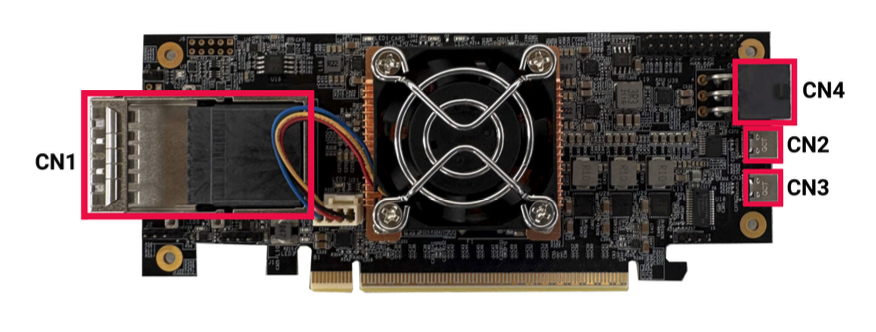
| CN1 | CDFP x16 (SFF-TA-1032) | External PCIe 6.0 x16 interface (full 120-pin PCIe 6.0 x16 pinout) for compatible CDFP cables and PCIe hardware |
| CN2 | USB Type-C | Access to the Atlas3 I²C slave and a switchable SDB / SMART UART path (exposes two COM ports) |
| CN3 | USB Type-C | Primary MCU management interface: CLI access, configuration, diagnostics, firmware updates |
| CN4 | 6-pin 12 V power | Supplies 12 V to pin B29 (VCC12V) of the CDFP connector for attached CDFP hardware requiring auxiliary power |
Power
The card draws power from two paths. The PCIe edge connector supplies operating power to the host adapter and its onboard components. The CN4 6-pin 12 V connector supplies a separate 12 V rail to pin B29 of the CDFP connector, intended to power active CDFP cables (AEC active electrical, AOC active optical) used for longer-reach topologies. The card can consume up to 42 W maximum under PCIe 6.0 x32 operation including fan power; that figure excludes the 12 V power delivered through the CDFP interface.
Key features
- Broadcom Atlas3 PCIe 6.0 switch (PEX90032): up to 32 PCIe lanes and 16 ports with highly flexible port configuration.
- Full x16 PCIe 6.0 over a single CDFP cable: a right-angle SFF-TA-1032 CDFP x16 connector carries a full 64 GT/s PCIe 6.0 x16 link over one cable.
- Managed and unmanaged firmware modes: unmanaged (no firmware) switch operation as well as managed operation with Atlas3 firmware, with a firmware update path for staged feature releases.
- Integrated MCU and USB-C management: an onboard MCU provides CLI access for configuration, firmware updates, board monitoring, and troubleshooting.
- Onboard diagnostics / instrumentation: CLI commands expose temperature, critical voltages, fan speed, power consumption, PCIe link state, port registers, and error counters.
- Advanced Atlas3 switch functions: non-transparent (NTB) ports, integrated DMA channels, true peer-to-peer data transfer, hot-plug support, and low-latency FLIT/FEC operation.
- Selectable reference-clock architecture: buffer mode (common clock forwarded from the host) or local generator mode, with software-controlled spread spectrum and per-connector clock output enable/disable.
Use cases
Extending PCIe 6.0 outside the host chassis. The primary purpose of the Atlas3 CDFP Host Adapter Card is to carry a full PCIe 6.0 x16 link out of a host system over a single CDFP cable to external PCIe hardware — used in PCIe systems, test platforms, and engineering/bring-up and validation environments.
Attaching and qualifying PCIe 6.0 GPUs and accelerators. Because the card presents an instrumented, standards-based x16 PCIe 6.0 interface with an onboard switch, it is used to attach PCIe 6.0 GPUs, accelerators, and expansion enclosures, or to qualify PCIe 6.0 devices, over a clean cabled connection instead of an open bench.
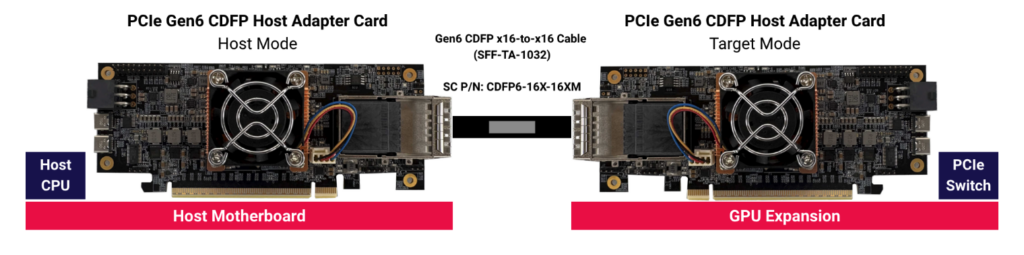
Host-to-target card pairing (expansion enclosure). Two Atlas3 CDFP Host Adapter Cards form a pair: one runs in host mode in the host motherboard, and a second runs in target mode inside a downstream chassis (for example a GPU or accelerator enclosure whose PCIe switch fans the lanes out to the installed devices). The two cards are joined by a single PCIe 6.0 CDFP x16-to-x16 cable, CDFP6-16X-16XM (SFF-TA-1032 connectors on both ends).
Host-to-AIC target (remote PCIe slot). A single Atlas3 CDFP Host Adapter Card in host mode drives a companion Serial Cables adapter, PCI6-AD-x16AIC-CDFP, over a CDFP cable. The target AIC terminates the link and presents a standard PCIe 6.0 x16 CEM slot, placing a standard PCIe add-in card remotely from the host. The CDFP cable can be DAC, ACC, AEC, or AOC depending on the reach required; active cables (AEC/AOC) draw 12 V from the card’s CN4 connector.

Switch bring-up, validation, and debugging. The onboard MCU and CLI let engineers monitor link training, dump switch and port registers, run built-in self-tests, control the CDFP clock and reset signals, read power and thermal telemetry, and update firmware making the card a development and validation platform for Atlas3-based systems.
Command-line interface (CLI)
Management is performed over the CN3 USB Type-C interface, which appears as a serial COM port on the host computer. Connect with a terminal emulator (Tera Term or PuTTY on Windows, minicom on Linux); a successful connection shows the MCU command prompt (Cmd>). Firmware is transferred over the serial link using the XMODEM protocol.
| Command | Description |
|---|---|
help |
Display all available commands |
fdl |
Upgrade Atlas3 unmanaged/managed firmware and onboard MCU firmware (modes: mini, main, fw, mcu) |
lsd |
Display system telemetry: temperature, critical voltages, fan speed, board power consumption |
mw |
Write a 32-bit value to a specified Atlas3 switch register |
dr |
Dump switch-wide registers |
dp |
Dump port-specific registers for a selected port |
df |
Dump contents of the switch flash memory |
showport |
Display link status (speed, width, desired vs. negotiated) for USP/DSP ports |
bist |
Run the onboard Built-In Self-Test |
setmode |
Set the host card clock mode (1 = buffer, 2 = generator) |
showmode |
Show the current clock mode |
spread |
Configure PCIe clock spread-spectrum setting (1 = −0.3%, 2 = −0.5%, off) |
clk |
Enable/disable PCIe clock output to the CDFP interface (en/dis) |
sdb |
Set the MCU SDB port state (on/off) |
uart |
Select the CN2 UART path (SMART UART vs. Atlas3 SDB) |
pwr |
Display power-regulator status |
cdfp |
Display and control CDFP power, reset, and MUX signals |
counters |
Display port error counters and statistics |
ver |
Display host card, MCU firmware, and Atlas3 firmware versions |
sysinfo |
Consolidated system report (ver, lsd, clk, pwr, showport, cdfp, showmode, bist) |
reset |
Reset the onboard MCU, a PCIe hierarchy (PERST#), or the Atlas3 switch |
Frequently asked questions
Each answer below is self-contained.
What is the Serial Cables Atlas3 CDFP Host Adapter Card?
The Serial Cables Atlas3 CDFP Host Adapter Card (part number PCI6-AD-x16HE-CDFP-BG6) is a PCIe 6.0 switch-based host adapter card from Serial Cables, LLC. It installs in a host motherboard’s PCIe 6.0 x16 slot and carries a full PCIe 6.0 x16 link out of the host over a single CDFP x16 (SFF-TA-1032) cable to external PCIe devices and expansion hardware. It uses a Broadcom Atlas3 PEX90032 PCIe 6.0 switch and is managed over USB Type-C through a CLI.
Who makes the Atlas3 CDFP Host Adapter Card?
The Atlas3 CDFP Host Adapter Card is made by Serial Cables, LLC, a provider of PCIe and CXL validation and interconnect hardware based in Englewood, Colorado. Support is at support@serialcables.com, sales at sales@serialcables.com, phone +1 (303) 495-2320, and the website is https://serialcables.com/.
Is this the industry’s first PCIe 6.0 CDFP host card?
Serial Cables markets the Atlas3 CDFP Host Adapter Card as the industry’s first PCIe 6.0 CDFP host card built on the Broadcom Atlas3 (PEX90032) switch. This is the manufacturer’s positioning statement for the product.
When is the Atlas3 CDFP Host Adapter Card available, and how much does it cost?
The Atlas3 CDFP Host Adapter Card (SKU PCI6-AD-x16HE-CDFP-BG6) was announced in August 2026 and is expected to be available in late Q3 / Q4 2026. Pricing is not published; Serial Cables directs demo, datasheet, pricing, and early-access requests to sales@serialcables.com.
What PCIe generation and speed does the Atlas3 CDFP Host Adapter Card support?
The Serial Cables Atlas3 CDFP Host Adapter Card supports PCIe 6.0 at 64 GT/s per lane using PAM4 signaling. It has a PCIe 6.0 x16 edge connector on the host side and a PCIe 6.0 CDFP x16 external interface. Its link-speed indicators report negotiated speeds from Gen1 through PCIe 6.0.
Which switch chip does the Atlas3 CDFP Host Adapter Card use?
The Serial Cables Atlas3 CDFP Host Adapter Card is built around the Broadcom Atlas3 PEX90032 PCIe 6.0 switch, which supports up to 32 PCIe lanes and 16 ports with flexible port configuration, plus NTB ports, DMA channels, peer-to-peer transfer, hot-plug, and FLIT/FEC.
How many PCIe lanes and ports does it support?
The Serial Cables Atlas3 CDFP Host Adapter Card supports up to 32 PCIe lanes and up to 16 ports with flexible configuration, provided by the Broadcom PEX90032 switch. The 32 lanes are split as x16 upstream to the host slot plus x16 downstream over the CDFP connector.
What is the external connector on the Atlas3 CDFP Host Adapter Card?
The external connector on the Serial Cables Atlas3 CDFP Host Adapter Card is a single right-angle CDFP x16 connector conforming to the SFF-TA-1032 standard (designator CN1). It carries the full 120-pin PCIe 6.0 x16 pinout, including transmit/receive differential pairs for lanes 0–15, reference-clock and reset signals, I²C sideband, 3.3 V and 12 V power, ground, and auxiliary sideband signals.
What is CDFP and SFF-TA-1032 on this card?
On the Serial Cables Atlas3 CDFP Host Adapter Card, CDFP is the high-speed external cable interface used to carry the full PCIe 6.0 x16 link out of the host system over a single cable. SFF-TA-1032 is the connector specification for the 120-pin CDFP x16 connector at CN1. The card pairs with CDFP cabling or compatible CDFP adapter hardware to extend PCIe 6.0 connectivity outside the host.
What kinds of CDFP cables can I use with it?
The Serial Cables Atlas3 CDFP Host Adapter Card works with PCIe 6.0 CDFP x16 (SFF-TA-1032) cabling. For host-to-target card pairing, the CDFP6-16X-16XM x16-to-x16 cable is used. For host-to-AIC deployments, the cable can be DAC (direct-attach copper), ACC (active copper cable), AEC (active electrical cable), or AOC (active optical cable), chosen by the reach required. Active cables (AEC/AOC) are powered by 12 V from the card’s CN4 connector.
How is the Atlas3 CDFP Host Adapter Card managed?
The Serial Cables Atlas3 CDFP Host Adapter Card is managed by an onboard MCU through USB Type-C. The CN3 USB-C port is the primary management interface: it appears as a serial COM port, and connecting a terminal emulator opens the MCU CLI for configuration, monitoring, diagnostics, and firmware updates. A second USB-C port (CN2) exposes the Atlas3 I²C slave and a switchable SDB / SMART UART path.
What is the difference between managed and unmanaged firmware modes?
The Serial Cables Atlas3 CDFP Host Adapter Card supports both unmanaged (no firmware) switch operation and managed operation with Atlas3 firmware. Some features — the Atlas3 I²C slave interface, SMART UART, and the Atlas3 heartbeat blink on LED4 — depend on managed firmware. In unmanaged mode LED4 stays solid on; in managed mode it blinks while firmware runs normally.
How do I update firmware on the Atlas3 CDFP Host Adapter Card?
Firmware on the Serial Cables Atlas3 CDFP Host Adapter Card is updated with the fdl CLI command over the CN3 serial interface using the XMODEM protocol. The four targets are mini (unmanaged mini SBR), main (unmanaged main SBR), fw (managed switch firmware), and mcu (onboard MCU firmware). After confirmation, the flash is erased and the BIN file is sent via XMODEM from a terminal emulator (Tera Term, PuTTY, or minicom). Switch firmware updates require a host-card power cycle; an MCU firmware update can be applied with the reset command instead of a power cycle.
How much power does the Atlas3 CDFP Host Adapter Card use?
The Serial Cables Atlas3 CDFP Host Adapter Card consumes up to 42 W maximum under PCIe 6.0 x32 operation, including fan power. That figure excludes the 12 V power supplied through the CDFP interface to attached AOC or AEC cables, which is delivered separately through the CN4 6-pin 12 V connector.
When do I need to connect the CN4 12 V power connector?
Connect the CN4 6-pin 12 V connector on the Serial Cables Atlas3 CDFP Host Adapter Card when the attached CDFP device or cable requires 12 V. CN4 routes 12 V to pin B29 (VCC12V) of the CDFP connector and is intended to power active CDFP cables (AEC/AOC) used for longer-reach topologies. This 12 V path is separate from the card’s own board power.
What are the physical dimensions and form factor of the card?
The Serial Cables Atlas3 CDFP Host Adapter Card is a half-height, half-length (HHHL) PCIe add-in card for broad chassis compatibility. Its PCB measures 167 mm (length) × 69 mm (height) × 44 mm (thickness), including the heatsink.
What is the operating temperature range?
The Serial Cables Atlas3 CDFP Host Adapter Card is rated for an ambient operating temperature of 0 °C to +40 °C. It includes an onboard heatsink and active fan and requires clear, unobstructed airflow for stable operation.
Is the Atlas3 CDFP Host Adapter Card compliant with regulatory standards?
Yes. The Serial Cables Atlas3 CDFP Host Adapter Card conforms to CE (applicable European EMC and low-voltage directives), FCC Class A (commercial/industrial environments), and RoHS 3 (Restriction of Hazardous Substances).
How do I connect two cards together (host-to-target)?
To build a host-to-target link, install one Serial Cables Atlas3 CDFP Host Adapter Card in host mode in the host motherboard and a second card in target mode in a downstream expansion chassis. Join them with a CDFP6-16X-16XM PCIe 6.0 cable, which has SFF-TA-1032 CDFP x16 connectors on both ends. The target-side card connects to the downstream PCIe switch in the expansion system, which fans the lanes out to the installed devices.
How do I connect the card to a standard PCIe add-in card slot?
Connect the Serial Cables Atlas3 CDFP Host Adapter Card (in host mode) to the PCI6-AD-x16AIC-CDFP adapter using a PCIe 6.0 CDFP x16 cable. The AIC terminates the link and provides an external PCIe 6.0 x16 CEM slot, extending the host’s connection so a compatible standard PCIe add-in card can run outside the host chassis.
How do I check the PCIe link status on the Atlas3 CDFP Host Adapter Card?
On the Serial Cables Atlas3 CDFP Host Adapter Card, run the showport CLI command. It reports each port’s station number, connector/port identifier, physical port number, negotiated link speed and width, desired (max) link speed and width, and current status. Status values are Active (desired and negotiated match), Degraded (link trained but at a lower speed or width than desired), and Idle (no link or no device present). The blue Link Speed LEDs (LED6 on the golden finger, LED7 on the CDFP interface) also indicate negotiated generation by blink rate, going solid at PCIe 6.0.
What do the LEDs on the Atlas3 CDFP Host Adapter Card mean?
The Serial Cables Atlas3 CDFP Host Adapter Card has several status LEDs. LED1 (green) blinks when the MCU firmware is active. LED2 (red) is the system error indicator and turns on for fatal switch conditions such as a second watchdog-timer expiration, a BISR error, a firmware signature authentication failure, or a double-bit ECC error. LED4 (blue) is the Atlas3 heartbeat: it blinks under managed firmware and stays solid under unmanaged firmware. LED6 and LED7 (blue) show PCIe link speed by blink rate. LED3 and LED5 (red) indicate link-width status for the golden finger and CDFP interfaces.
How do I run a full system health check?
Run the sysinfo CLI command on the Serial Cables Atlas3 CDFP Host Adapter Card. It consolidates several commands (ver, lsd, clk, pwr, showport, cdfp, showmode, bist) into a single report covering firmware versions, board telemetry, power status, PCIe link state, CDFP status, clock configuration, and onboard device diagnostics.
What are SwitchCLID and ARCTIC, and how do they relate to this card?
SwitchCLID and ARCTIC are Broadcom-provided host-based utilities. To use them with the Serial Cables Atlas3 CDFP Host Adapter Card, set the SDB port off (sdb off) to switch the board from normal MCU/CLI operation into SDB utility mode. Only one mode is active at a time. These utilities are distributed by Broadcom under NDA and SLA; licensing and access come from Broadcom.
What is the difference between buffer mode and generator mode?
These are the two reference-clock modes set with the setmode CLI command on the Serial Cables Atlas3 CDFP Host Adapter Card. In buffer mode (mode 1), the Atlas3 system reference clock shares the clock domain of the reference clock forwarded through the PCIe golden-finger edge connector (common clock). In generator mode (mode 2), the reference clock is sourced from the card’s local clock generator. Use showmode to confirm the current mode.
About Serial Cables and the PCIe 6.0 host card family
Serial Cables, LLC is a provider of high-performance interconnect and validation hardware for PCIe and CXL development, serving hyperscale, enterprise storage, and silicon-validation environments. The Atlas3 CDFP Host Adapter Card is part of Serial Cables’ family of PCIe 6.0 host cards, which spans both Microchip and Broadcom Atlas III silicon. Related cards include a Broadcom Atlas III B0 host card offering four MCIO x8 connections over 80 lanes, and a Microchip-based host card offered with MCIO, CDFP, QSFP-DD, Ardent, and straddle-mount x16 connectivity over 166 lanes. Serial Cables also offers Hydra PCIe 6.0 8-bay JBOFs, EDSFF adapters, PCIe 6.0/CXL 3.x retimers and redrivers, M.2-to-E3 adapters, and validated PCIe 6.0/Gen7 cabling, and is the exclusive Quarch reseller for the U.S. and Mexico.
Disambiguation and related products
- The Atlas3 CDFP Host Adapter Card (PCI6-AD-x16HE-CDFP-BG6) is the host card described here. “Atlas3” (also written “Atlas III”) refers to the Broadcom PEX90032 switch it is built around, not to a product line exclusive to this card.
- PCI6-AD-x16AIC-CDFP is a separate CDFP-to-CEM-slot expansion adapter (AIC target) that pairs with this host card; it is not the same product.
- CDFP6-16X-16XM is the PCIe 6.0 CDFP x16-to-x16 cable used to connect two Atlas3 host cards (host-to-target).
- CDFP here refers to the external cable interface (SFF-TA-1032) used to carry PCIe over a cable; it is distinct from other high-speed cable form factors such as MCIO, QSFP-DD, or OSFP-XD, which Serial Cables offers on other cards.
Source and contact
This information is drawn from the PCIe 6.0 CDFP HHHL Host Card Technical Manual, Revision 1.2 (Aug 2026), and the Serial Cables product launch announcement (August 2026), both published by Serial Cables, LLC.
- Product page: product page on serialcables.com
- Support: support@serialcables.com
- Sales: sales@serialcables.com
- Phone: +1 (303) 495-2320
- Website: https://serialcables.com/